Quick Answer: Instagram Shopping allows brands to tag products in their feed posts, reels, and stories, letting buyers click through to view a product, see its price, and purchase without leaving the application. Getting this feature requires having a business account, a product catalog set up in Meta Commerce Manager, and approval from Instagram. With the right setup, every post becomes a potential sales channel.
Instagram Shopping has come a long way since its launch in 2018. It has evolved from an interesting novelty to a serious sales channel. In 2026, brands that have mastered Shopping features see a serious revenue differential over those that use Instagram strictly for brand discovery and awareness.
Here is a full guide to how Instagram Shopping is used today, what you need to set it up, and the content strategy that turns viewers into buyers.
How Instagram Shopping Works in 2026
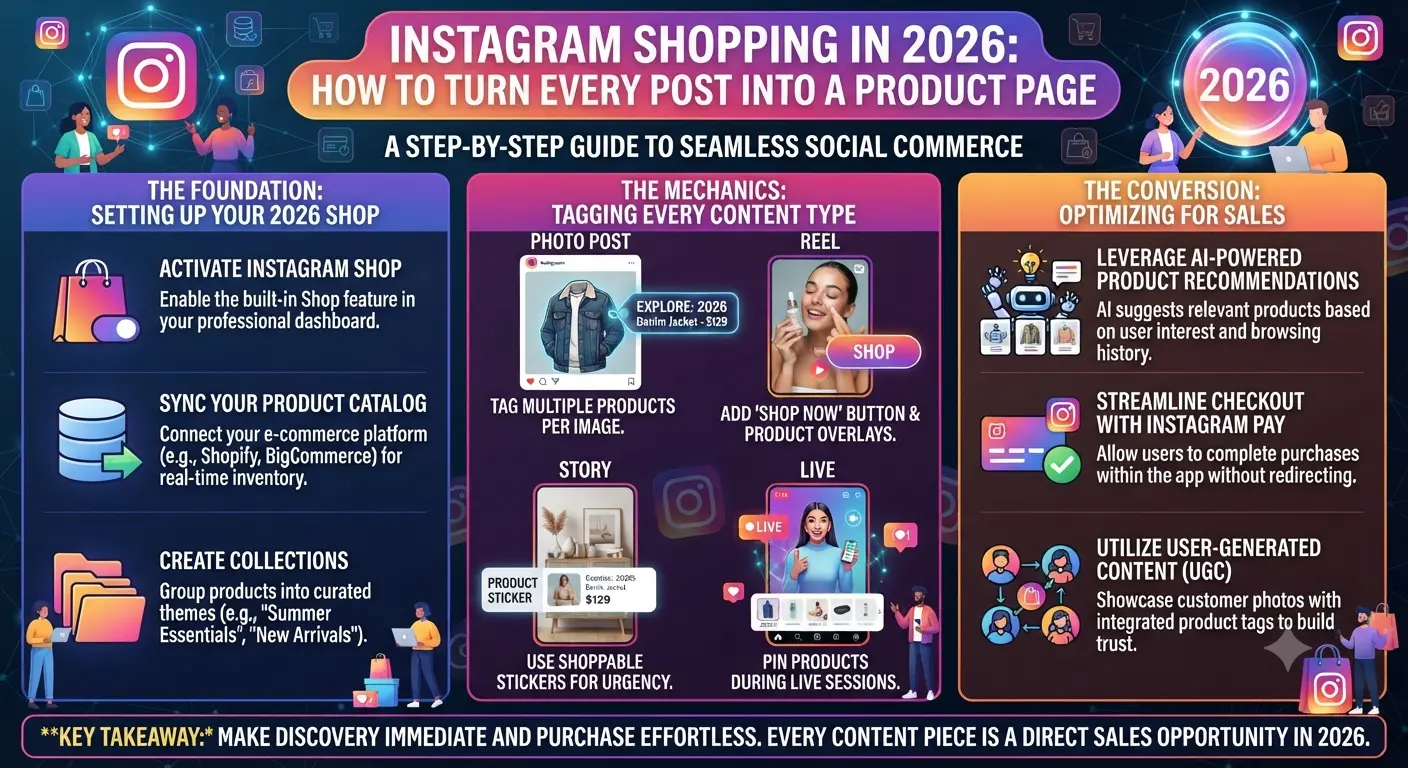
Instagram Shopping adds a commerce layer to the social network. By tagging a product in your post, you turn it into a shoppable item. A small bag icon appears on the image, and users can click through to see the product information, name, price, and a link to purchase. Depending on your settings, the link can send users to your website or, if you have it set up, allow them to purchase in the application through Instagram Checkout.
The application also features a Shop tab on business accounts and a browsable discovery feed within the application itself. The latter means that your tagged content can appear on the screen of someone who has never followed your brand but Instagram thinks will be interested in your products
| Content Type | Product Tagging | In-App Checkout | Shop Discovery | Best Use Case |
|---|---|---|---|---|
| Feed Posts | Yes | Yes | Yes | Lifestyle imagery, product features |
| Reels | Yes | Yes | Yes | Product demos, unboxings, tutorials |
| Stories | Yes (sticker) | Yes | No | Flash sales, limited offers, swipe-up conversion |
| Live | Yes (pinnable) | Yes | No | Live product launches, Q&A with purchase |
| Carousels | Yes (per slide) | Yes | Yes | Product collections, before and after, how-to |
130MInstagram accounts tap product tags in shopping posts each month globally
70%of Instagram users report finding new products on the platform
44%of Instagram users use the platform to shop weekly in 2026
Setting Up Instagram Shopping: Step by Step
Complete Instagram Shopping Setup
1Make sure you have a Business or Creator account and that you are in a country where shopping is available (it’s now in over 70 countries).
2If you haven’t already, link a Facebook page to your Instagram account through the Accounts Center.
3Head to business.facebook.com and open Meta Commerce Manager. Create a catalog and upload your products by hand, through a CSV file, or by linking your e-commerce platform. Most major CMS’s have a direct integration, including Shopify, WooCommerce, and Big Commerce.
4Go to your Instagram Settings, click on Business, and then Shopping. Link the catalog you created and submit for moderation.
5Wait for the confirmation that your application has been approved. It usually takes between one and five days for your account to be reviewed. Once you receive approval, start tagging products in your posts.
6You can begin by tapping the product tag in your first post, reel, or story and searching your catalog for the items you want to feature.
Instagram Shopping Features by Content Type
Content Type Product Tagging In-App Checkout Shop Discover Best Use Case
Feed Posts Yes Yes Yes Lifestyle imagery, product features
Reels Yes Yes Yes Product demos, unboxings, tutorials
Stories Yes (sticker) Yes No Flash sales, limited offers, swipe-up conversion
Live Yes (pinnable) Yes No Live product launches, Q&A with purchase
Carousels Yes (per slide) Yes Yes Product collections, before and after, how-to
The Content Strategies That Convert Browsers Into Buyers
Lifestyle Context Over Product Isolation
While product photos on a white background work well in marketplaces, they are not effective on Instagram. It is a platform of lifestyles, where the content competes for attention with the posts of friends and family. A product in context, in use in the environment the target buyer interacts with daily, will always outperform a product photo on a white background on engagement and clicks. The product tag turns the engaging feed post into a discovery experience, preserving the discoverability that Instagram promotes while adding a commercial layer.
Story Shopping for Urgency and Flash Sales
A story with a sticker, an image of the product, and a sense of urgency, whether it is a limited stock or a time-limited special price, is a powerful combination. The flash sale and urgency mechanics are perfect for the ephemeral nature of the stories, which disappear after 24 hours. The sense of urgency is an element that cannot be easily replicated in feed placements.
Reel Product Demonstrations
A reel that showcases the product in action, demonstrates its use, and highlights its benefits will have a higher conversion rate from the product tag than a still image. The potential buyer browses the product in the scenario where it will be used, which provides a stronger purchasing impulse than a product image. Additionally, if the application is a cooking-related product, a reel showcasing its use in a recipe will target the person who is cooking the dish as much as a general feed post.
User-Generated Content With Product Tags
The ability for brands to repurpose user-generated content by tagging the products in them provides a tremendous opportunity to build social proof at the point of discovery. A customer’s content, showcasing the product and its benefits, is a powerful piece of social content. The key to using this feature is getting permission to use the content in the first place. It is one of the highest-converting Instagram Shopping strategies.
The most underutilized feature of Instagram Shopping for most brands is the Shop page itself. The majority of brands set up a product catalog and forget about the rest. Creating collections and organizing products into them, writing product descriptions, and updating the catalog regularly can provide an experience similar to a dedicated e-commerce site. The Shop tab on the business profile should be treated as a standalone page, not as a catalog for tagged products.
Key Takeaways
Instagram Shopping allows brands to turn their feed posts, reels, stories, and carousels into shoppable experiences. This functionality requires a business account, a linked Facebook page, and a product catalog set up in Meta Commerce Manager. The application process for Instagram Shopping takes between one and five days before the product tag appears in the content creation tool.
Contextual photos such as lifestyle images or product use scenarios are much more effective for Instagram Shopping than product-only images. Stories provide the best value for time-sensitive promotions and sales because of their sense of urgency and impermanence. Repurposed user-generated content with product tags provides the most significant social proof at the point of discovery. The Shop page on the business profile should be treated as a standalone catalog and optimized as such.
Frequently Asked Questions
How do I set up Instagram Shopping for my business?
To set up Instagram Shopping, you need a business account, a linked Facebook page, and a product catalog set up in Meta Commerce Manager. Connect the catalog to your Instagram account, and submit for approval. Approval takes between one and five days, and once you receive it, you can start tagging products in your posts.
Can customers buy products directly on Instagram without going to my website?
It depends on where you are located. If you are in the United States or another country with Instagram Checkout available, you can set up your account to allow purchasing in the application. Otherwise, the product tag will redirect to your website to complete the purchase.
Does Instagram Shopping work for service-based businesses?
Instagram Shopping is only available for businesses with physical products to sell. Service-based businesses can use the application’s appointment-setting feature or a link-in-bio tool to drive bookings.
How many products can I tag in one Instagram post?
You can tag up to five products in a single image post, up to 20 products in a carousel post, one product per slide in a story, and 20 products in a reel in a browsable list under the video.
Does Instagram Shopping affect the organic reach of my posts?
Shoppable posts can appear in the discovery feed, which is an additional audience reach benefit over regular posts. It is unclear if tagged posts receive a lower reach from the regular feed algorithm.