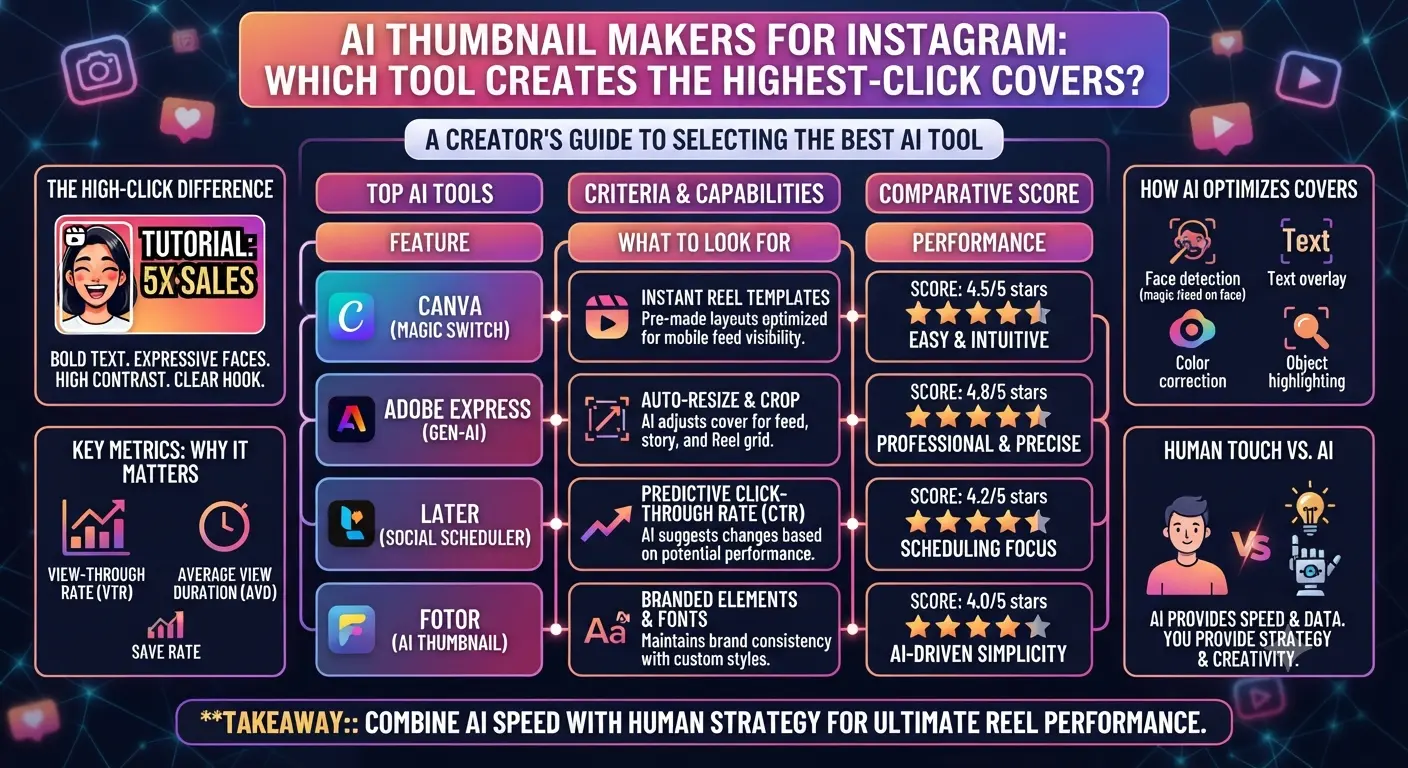
Quick Answer: The best AI thumbnail tools for Instagram in 2026 are Canva AI for ease of use and variety, Adobe Express for quality, Kittl for typography-focused covers, and Thumbnail AI for click-through rate optimization. Your selection depends on your design abilities, budget, and whether you prioritize aesthetics or conversion.
Your Instagram Reel cover image appears in your profile grid, the Reels tab, and sometimes in the Explore feed. Highlight covers determine the first visual impression of your curated content collections. These thumbnail images are small, crowded, and scanned for less than two seconds before a viewer decides to engage or continue scrolling.
Most creators use either a random still frame from their video as a Reel cover or a hastily designed image with no particular strategy. AI thumbnail tools have effectively eliminated any justification for not having a professional-looking cover image for your Instagram content.
Below, we will discuss what makes a great thumbnail and which tools are best for different creator needs.
What Makes a High-Click Instagram Thumbnail
Before discussing the differences between the tools, it is worth reviewing the general design guidelines for high-click thumbnails on Instagram. These principles apply to any tool that you use to design your thumbnails.
Contrast and readability at a small size dominate a high-click thumbnail on Instagram. A large, attractive thumbnail in full size does not compensate for poor composition when it appears tiny in the profile grid. Prioritize the legibility and compositional balance of your thumbnail at 100 pixels wide, the size at which it will appear in a user’s profile.
A text hook consisting of three to five words that provokes curiosity or indicates the benefit of watching performs better than a purely visual thumbnail. This is particularly true for educational and informational content. Entertainment content performs better with an engaging face or visual. A combination of an engaging visual and a short text hook produces the best results across all niches and content types.
Consistency between your thumbnails helps potential followers recognize and remember your brand on the first visit to your profile. If your thumbnail series has a consistent color scheme, this will produce higher follow rates than the quality of a single thumbnail.
The Best AI Thumbnail Tools in 2026
Canva AI
Best for Ease of Use
Canva’s Magic Design tool creates thumbnail templates based on a text description of your content. Simply describe your video, and Canva will produce ten thumbnail designs for you to choose and customize from. The quality and variety of templates are excellent, and the export settings are pre-configured for Instagram cover images. Canva’s free plan is sufficient for most creators’ needs.
Adobe Express
Best for Quality
Adobe Express combines impressive AI tools with access to Adobe’s resources and libraries. It produces higher quality images than Canva when the customization is taken to the next level. This learning curve is worth overcoming if you want the best quality and already have an Adobe Creative Cloud subscription. The standalone plan costs around ten dollars per month.
Kittl
Best for Typography
Kittl is an interesting option for creators who need high-quality text on their thumbnails, which most do. Most thumbnail design tools produce low-quality text, but Kittl focuses on producing high-resolution text effects that most designers would not think to create. This is an excellent choice for educational content, podcasts, and writers’ thumbnails, where the text hook dominates the visual.
Thumbnail AI
Best for Conversion
Thumbnail AI is unusual in that it focuses specifically on increasing the click-through rate of your thumbnail rather than its visual appeal. It accomplishes this by analyzing your content and recommending certain psychological triggers based on the topic of your video. Thumbnail AI produces lower quality designs than other tools, but it focuses on what potential viewers actually want to see.
Snappa
Best Free Option
Snappa offers a generous free plan with Instagram-specific templates and an easy drag-and-drop interface. While most of the advanced AI features are behind a paywall, the quality of its templates is good enough that most creators will be satisfied with the free plan.
How to Create a Consistent Thumbnail Series
A single great thumbnail is not nearly as valuable as an entire series of thumbnails that share consistent visual elements to help potential followers recognize your brand. Below are a few tips for creating a consistent series of thumbnails.
Thumbnail Creation Tips
1Create a master thumbnail for each of your content pillars, assigning a specific set of colors, fonts, and layout rules to each. This way, your followers will be able to identify similar content at a glance.
2Save your master templates somewhere accessible, with only the text and one image placeholder being editable. This makes it extremely quick to create a new thumbnail every time you post a new piece of content.
3When creating a new piece of content, simply pull the relevant template, change the text hook and image, and export in under five minutes.
4Make sure to export your thumbnails at 1080 x 1920 pixels for Reel covers (9:16 ratio) and 1:1 ratio for highlight covers and profile grid thumbnails. You can use your templates to export both sizes simultaneously.
AI vs Manual Design: What Creators Actually Gain
The biggest benefit of AI tools goes to creators without any design background, as the learning curve of software such as Adobe Express is too steep for most of them. The alternative to using an AI tool is either not using a thumbnail at all (random video frame) or spending much more time learning graphic design software just to produce one decent thumbnail.
Many creators who have some background in graphic design benefit from AI tools in a different way: by reducing the amount of time spent designing and allowing them to focus on the more important aspects of their content. Creating five thumbnail variations in five minutes with AI tools is much faster than spending thirty minutes designing a single thumbnail.
A test that most creators do not run involves posting the same content topic with two different thumbnails within two weeks of each other. The views on the two pieces of content will be significantly different, with the higher performing thumbnail receiving more views from outside the follower base. This is because the view count is split between views from within the viewer’s follower base and views from the general audience. The second type of views is significantly more valuable, as these are the views that contribute to new viewers discovering your content via the Explore tab or the Reels tab on Instagram.
Key Takeaways
Canva AI is our favorite tool for ease of use and consistency due to its excellent templates and customization options.
Adobe Express produces the highest quality images, which is worth the investment if you have an Adobe subscription or are willing to spend around ten dollars per month for a good design tool.
Kittl is ideal for creators whose thumbnails focus primarily on text rather than images due to its excellent text effects.
Thumbnail AI is best for creators who want to increase the click-through rate of their thumbnails rather than focusing on their visual appeal.
A system of pillar thumbnails drastically reduces the time spent on thumbnail creation, especially when used in combination with the tools mentioned above.
Creating a series of thumbnails that follow the same visual system is more valuable than a single, attractive thumbnail.
Highlight covers are much smaller than Reel covers, so they require a much simpler design that utilizes high-contrast elements and readable text.
Creating a system of highlight covers that follow the same general theme is even more important than for Reel covers since they appear in a much smaller form on the user’s profile.
Frequently Asked Questions
What size should Instagram Reel thumbnails be?
Instagram Reel thumbnails should be 1080 x 1920 pixels in a 9:16 ratio, the same ratio as the Reel video itself. Instagram crops the thumbnail to a square when it displays it in your profile grid, so make sure to place important elements in the center third of the image.
Does the Reel cover image affect how many views the Reel gets?
Yes, but only for views that come from the profile grid or from the discover tab, where the Reel cover is also visible. A good Reel cover increases the likelihood that someone will watch the Reel after seeing it on another user’s profile grid. It also improves the chances of getting clicks in the Reels tab, where Reels are browsed in a grid of covers in much the same way as the profile grid. The Reel cover does not affect the algorithm that determines how many times your Reel appears in your followers’ Reels tabs, where the Reel video itself is visible before the user decides to watch it.
Can I use AI-generated images as Instagram Reel covers?
Yes, since Instagram does not differentiate between AI-generated and photographic images. However, the Instagram AI labeling system will label an AI-generated image as such if it detects it.
What makes a good Instagram highlight cover design?
Highlight covers appear in a much smaller size than Reel covers, so the design elements need to be very simple. Most highlight covers utilize some form of graphic or text that can be recognized at a small scale. A consistent background color across all of your highlight covers will also improve the appearance of your profile in a much more noticeable way than most other design elements.
Is it worth paying for a premium AI thumbnail tool?
It depends on how often you post content. If you post multiple times per week, the time saved by using a good template system will more than justify the cost of a premium tool. With a good system in place, creating a new thumbnail can take as little as five minutes, compared to thirty minutes or more that it would take using a traditional graphic design tool. If you post less frequently, the free plan from Canva will suffice for most needs.