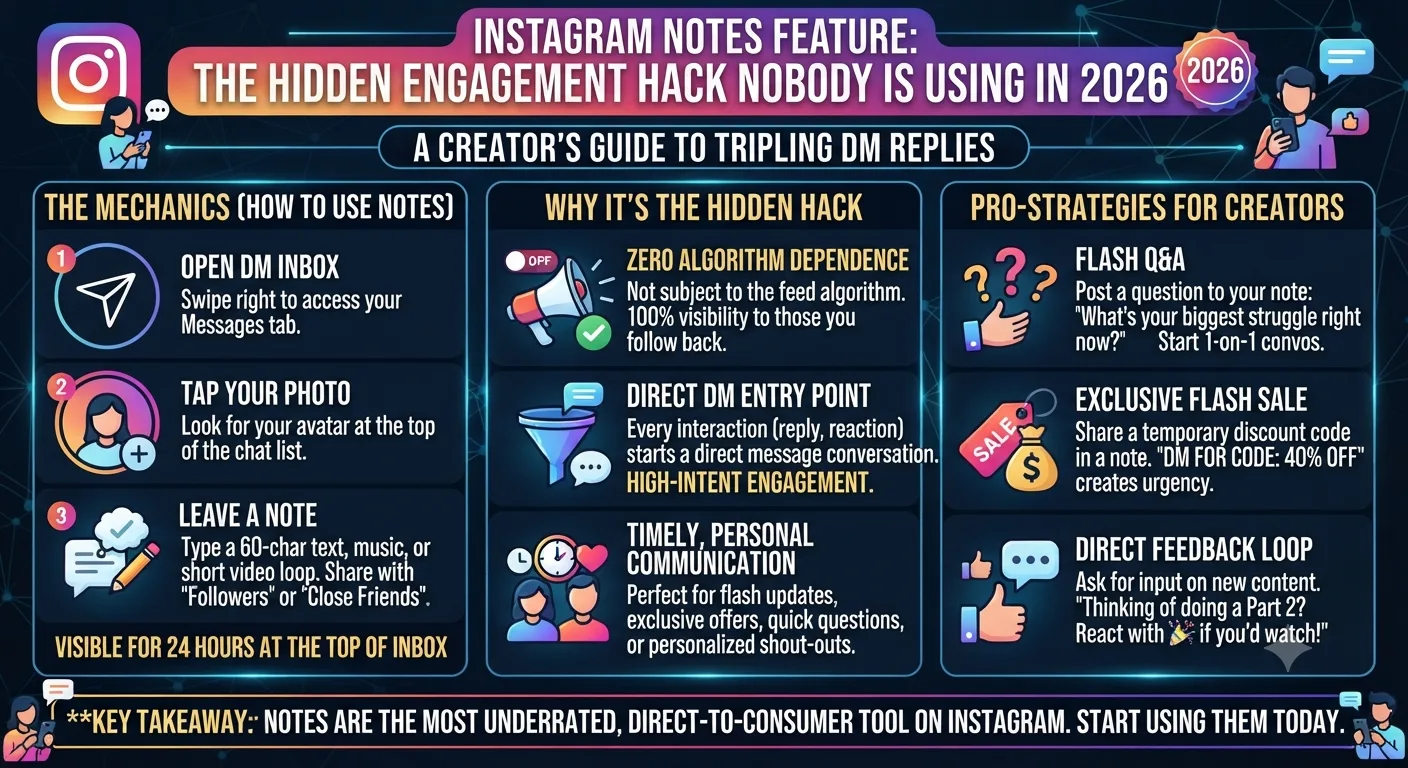
Quick Answer: Instagram Notes are short text messages of up to 60 characters that appear at the top of your followers' DM inboxes for 24 hours. They are seen by your followers and those who follow you back, generate no feed competition, and get replies directly to your DMs. Almost no creators are using Notes for their posts consistently as of 2026, making it one of the least competitive high-visibility spots on the entire platform.
Instagram Notes launched quietly, and most creators didn't think much of them. Four years later, it remains almost completely unused as a strategic content tool while also taking up some of the most valuable real estate on the platform: the top of your followers' DM inboxes, directly above every personal conversation they have.
If a story, being first in the story tray, is valuable due to its location, then a Note, shown above every DM a conversation a follower has, is arguably more valuable still. It is impossible to miss. Here is why Notes are being missed and how exactly to use them.
What Instagram Notes Actually Are
Notes are text snippets of up to 60 characters that you can post from your DM inbox. When you post a Note, it appears at the top of the DM inbox screen, as a follower you have who also follows you back (and close friends, if you so choose) see it. It also appears on your profile for those who visit it. The Note disappears after 24 hours, just like a story.
Unlike stories, Notes have no visual component. They are pure text. Unlike feed posts, they generate no algorithmic complexity. Unlike DMs, they go to everyone without requiring individual conversations. The format is the closest thing Instagram has to a Twitter-style microblog but in a position most people check more frequently than any feed: their DM inbox.
Prime Placement
Shows up on the very top of every eligible follower's DM inbox, above all personal messages. Impossible to miss when they open up their DMs.
⏱️ 24 Hour Window
Vanishes off the map after 24 hours, like a story. Keeps your place in the inboxes of your followers fresh without clogging it up
💬 DM Reply Trigger
Followers can reply to your Note, which opens up a new DM conversation. Notes are among the highest conversion triggers for organic DM conversations on the platform.
🔇 No Algorithm Competition
Notes don't fight in the algorithm, they show up for every eligible follower, regardless of if they've engaged with you or not.
Why Almost Nobody Is Using Notes Strategically
When Notes first released, the default behavior for most creators was to embrace the informal, intimate nature of the post type and use it as a more casual way to share song suggestions, mood updates and other short notes with their friends. Notes, at launch, had a 60 character limit, which made many creators feel like it wasn't a worthy medium for sharing their more detailed thoughts. Many creators posted a few notes out of curiosity and then moved on.
The strategic opportunity that has been missed is that the 60 character limit for Notes is not a limitation, it's a catalyst. Every single note has to be pithy enough to either intrigue the reader into clicking or provide a thorough, insightful micro-insight. Notes are forced to eliminate fluff, vagueness, and filler language by their very nature.
The prime placement of Notes in the conversation thread is also an advantage, in that it has a much lower barrier to entry than a post in the feed would. The act of checking a message already puts the follower in a conversational, receptive mindset, and a well-placed note will have much higher conversion to DM replies than a similar post in a story or in the feed would.
The Note Formats That Drive the Most DM Replies
The Curiosity Gap Note
A Note with a provoking thought that you don't finish because it's so good. "The posting time that tripled my reach..." or "Nobody talks about this Instagram mistake..." The mystery of the unfinished thought is sufficient to prompt followers to respond to ask what you mean, prompting a DM which you can then use to steer the conversation anyway you want.
The Direct Question Note
Ask only one question that is simple to answer with a word or two. "Reels or carousels for you?" or "What is your niche?" or "Morning or evening poster?" The easier it is to respond the more likely it is to provoke a response. Notes with yes/no answers or very short answers usually produce the best response rate in terms of DMs per Views.
The Micro-Tip Note
A complete tip, that will fit in 60 characters. "Slide 2 on carousels is your second hook" or "Save rate matters more than likes" or "Post when your top fans are online." Tips are great because they're immediately useful and quotable. Many Notes get comments from people asking if the tip is true and then the conversation moves on to a DM dialogue.
The Timely Update Note
A short note for an update on something happening now, a live post or a time sensitive offer. "New carousel just dropped" or "Sale ends tonight at 9" or "Going live in 20 minutes." Notes are great for these kinds of updates because the visibility of the DM means it will be seen, unlike a story tray or algorithmic feed.
How to Integrate Notes Into a Daily Content Workflow
Notes require almost no production time and can therefore maintain a daily posting habit in a way that Reels and carousels can't. To sustain a daily Notes habit, post one daily teaser Note asking a question to research your audience's preferences, sharing a stand-alone micro-insight from your niche, or previewing the content to come that day.
How to Post an Instagram Note
1Open Instagram on your phone and tap the DM icon in the top right corner of the home screen.
2Tap the Note area at the very top of your DM inbox. It may show your current Note or an invitation to share a thought.
3Type your Note text. You have 60 characters including spaces, and the counter shows how many characters remain.
4Choose your audience: followers you follow back, Close Friends only, or a custom list.
5Tap Share. Your Note is live immediately and disappears automatically after 24 hours.
The competitive window in 2026: Since so few creators are posting Notes consistently, the feature has no competition for visibility in the DM inbox. Every follower who opens their DMs sees your Note at the top regardless of how many accounts they follow, which would never be the case in the feed algorithm. This window will likely close as more creators discover the engagement potential. The goal to use Notes consistently now is to build the habit and the audience expectation before the feature takes off.
Key Takeaways
Instagram Notes show up at the top of eligible followers' DM inboxes for 24 hours giving them one of Instagram's most coveted visibility slots.
Notes are limited to 60 characters and don't compete with the feed or story tray algorithms.
Curiosity gap Notes, direct question notes, micro-tip notes, and timely update notes are the four kinds of Notes that get the most DM replies.
DM replies from your Notes give relationship signals to boost your position in the replier's story tray giving you a compounding boost when you post stories.
Few creators are using Notes strategically in 2026 making it an incredibly low hanging fruit high visibility engagement tool.
Posting daily Notes takes under two minutes and serves as a micro-content layer to amplify the reach of your content.
Frequently Asked Questions
What is the Instagram Notes feature?
Instagram Notes are short text posts of up to 60 characters that show up at the top of your followers' DM inboxes for 24 hours. Followers who follow you back can see your Notes (and reply directly opening a DM conversation). Notes have no visual component and disappear automatically after 24 hours with no action required.
Who can see your Instagram Notes?
By default Notes are visible to followers who also follow you back and your Close Friends list (if you choose). You can select which audience group sees each Note when you post a Note. Notes aren't public facing like feed posts aren't discoverable in Instagram search or hashtag results.
Do Instagram Notes affect your story or feed reach?
Not directly, Notes function outside of the feed or story algorithms. But replies to Notes create relationship signals to boost your position in the replier's story tray improving your reach potential for future story posts you make with engaged followers.
Can you add music or images to Instagram Notes?
Instagram added a music integration to Notes in late 2023 enabling you to share a song with your text Note. Images aren't supported. Notes are primarily a text medium with the optional music addition but the 60 character text limit still applies.
How often should you post Instagram Notes?
Daily posting is a practical frequency given the production time investment required for Notes. The 24 hour display window means a daily cadence will keep you at the top of eligible followers' inboxes. If daily posting feels excessive two to three times per week is a reasonable frequency if daily posting feels like an overhead for your current workflow.