Quick Answer: Make.com enables you to automate hundreds of other applications, including Instagram, with visual workflow automation. The 5 most popular Instagram automations in 2026 are: auto-posting content from Google Drive or Notion into a schedule, auto-reposting your Instagram posts to other platforms, receiving email or slack notifications when a new post is published, auto-generating captions from content briefs, and logging Instagram analytics into a Google Sheet every week.
Make, previously known as Integromat, is an automation platform that enables connecting various applications through visual scenarios without any coding. Actions in one application trigger the execution of scenarios in the connected apps. For Instagram creators and brands that have repetitive tasks, Make can save hundreds of hours of work weekly.
While there is a steeper learning curve than a standard social media scheduler, Make provides a powerful visual automation workflow for anyone who wants to save hours a week by automating their Instagram content creation and management. The following article highlights the 5 most important automations in 2026 for brands and creators that use Instagram for marketing and customer engagement.
Understanding How Make.com Works
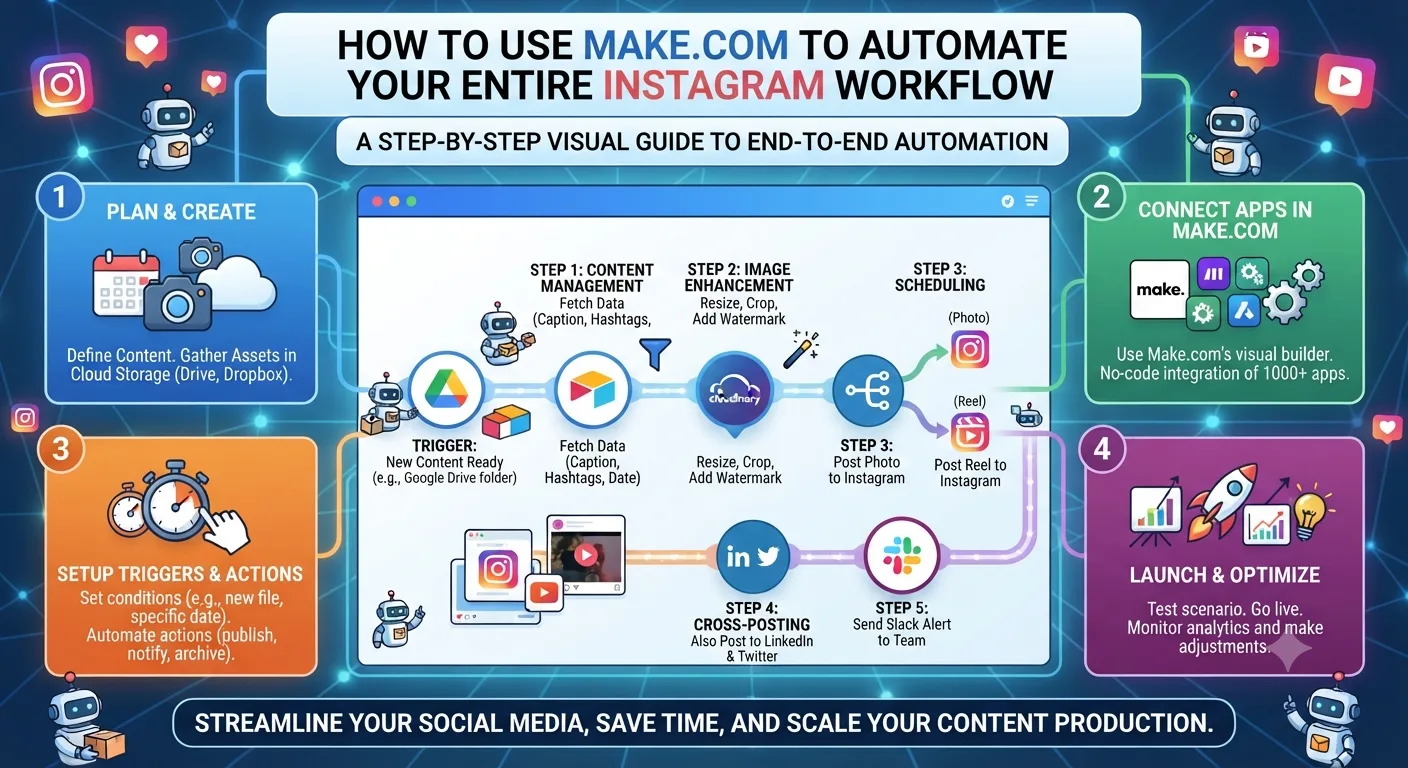
Every Make.com automation is referred to as a scenario. Each scenario consists of a trigger, the event or data alteration that initiates the scenario, and one or more modules, the actions to be taken. An example of a simple scenario would be to take the content added to a row in a Google Sheet and both sending that content to a scheduling tool and adding it to a content calendar in Notion. A more complex scenario could involve aggregating data from multiple sources, processing it with an AI tool, and distributing the results across multiple platforms.
Make provides a visual drag-and-drop interface for constructing scenarios, which are generally much simpler to construct than they appear at first glance. The logical connections between steps must still be made, but the actual coding is handled by Make. Most people who use Make for automation on Instagram report spending four to eight hours automating their first scenarios, with very little maintenance required once they're set up.
Automation 1: Auto-caption Generation From Content Briefs
This automation connects your content calendar in Notion or Google Sheets to the Claude or OpenAI API, generating Instagram captions from your topic briefs written in your calendar of choice.
1
Trigger
New row added in Google Sheet content calendar
2
Extract
Pull topic, pillar, tone, and CTA from the row
3
Generate
Send brief to Claude or OpenAI API for caption draft
4
Output
Write generated caption back to the Sheet row and send to Slack or email for review
Time saved per week: approximately 60 to 90 minutes of caption drafting, replaced by a five-minute review and editing session for each generated draft.
Automation 2: Cross-Platform Content Distribution
When you publish a new post to Instagram through your scheduling tool, Make can now automatically adapt and distribute the same content to other platforms. This is the most popular Make automation among Instagram creators who also maintain an active presence on LinkedIn, Pinterest, or Twitter.
TriggerNew post published via Later or Buffer API
Action 1Send caption to OpenAI to reformat for LinkedIn tone and length
Action 2Post reformatted version to LinkedIn with original image
Action 3Create Pinterest pin with caption adapted for keyword-rich Pinterest format
Action 4Log the cross-post in a Notion tracking database with date and platform
Time saved per week: 45 to 75 minutes of manual cross-posting and caption adaptation across platforms.
Automation 3: Weekly Analytics Report to Google Sheets
Having to manually pull Instagram stats each week and enter them some sort of spreadsheet is one of the most tedious recurring content tasks. Make.com can automatically pull the data from your scheduling tool or directly from the Instagram Graph API and write it to a Google Sheet on a schedule you set.
The scenario runs weekly, pulls reach, impressions, profile visits, follower change and top post engagement for the week, and writes each of these metrics as a new row in your analytics sheet with the date. It builds a historical analytics database over time that is much easier to analyze trends from than piecing together screenshots.
Automation 4: New Follower Welcome DM
When someone subscribes to your account, Make.com will send them a welcome message DM, which would introduce your Broadcast Channel, your best resource, or current offer. One of the best conversion automations available on Instagram in 2026
Important note: Instagram's terms of service state that certain types of automated DM activity are prohibited. Welcome DMs initiated through Make.com via official Instagram Graph API are acceptable. Any other automation that fakes human activity or sends out mass DMs through unofficial means is likely to get you banned. Always use Make.com official Instagram connection for any DM automation, not unofficial workarounds.
Automation 5: Content Idea Pipeline From RSS and Web Sources
This automation watches for new articles in RSS feeds from industry magazines, newsletters, and competitor blogs and automatically adds relevant new articles to your content ideas database in Notion along with an AI-generated summary and suggested Instagram content angle.
TriggerNew item in RSS feed from monitored industry sources
FilterCheck if headline matches keywords relevant to your niche
Action 1Send article URL and headline to Claude API for summary and content angle generation
Action 2Create new Notion database item with article link, summary, suggested angle, and date
Action 3Send Slack notification: "New content idea added to Notion"
Time saved per week: 30 to 60 minutes of manual industry reading and content idea sourcing, replaced by a daily five-minute review of the auto-populated ideas database.
Getting Started With Make.com for Instagram
Make.com has a free plan that includes 1,000 operations per month, enough to test each of the five automations above before upgrading to a paid plan. The paid plan, Starter, costs nine dollars per month and includes 10,000 operations per month, enough to carry out a full Instagram workflow as a professional.
It is best to start with automation 3, the weekly analytics report, since it is the easiest to set up and provides immediate value by requiring no API keys from third-party AI services. In this way, one can familiarize themselves with Make’s interface before attempting to set up more involved caption generation and cross-posting automations.
Key Takeaways
-
Make.com ties together Instagram and other apps through visual workflow automation that does not require coding, but rather is triggered by events and performs a chain of actions automatically.
The five most useful Instagram automations are caption generation from a content brief, distribution across platforms, weekly analytics report, new follower welcome direct message (DM), and content idea pipeline from feeds such as RSS.
Turning a content brief into an auto-generated caption that is tied to the Claude or OpenAI API cuts 60 to 90 minutes off a weekly content creation routine and replaces it with a five-minute review.
The automation of cross-posting removes the tedious work of reformatting and re-posting the same content on different platforms such as LinkedIn and Pinterest. It can be used on any social media channel where the content is relevant.
The easiest way to start using Make.com is by trying out the weekly analytics report automation. It helps the creator to get more comfortable with the platform before getting into more involved processes that require connecting AI apps.
The free plan of Make.com comes with 1,000 operations per month, which is enough to try out the five most popular automations before upgrading to a paid account.
Frequently Asked Questions
Does Make.com integrate directly with Instagram?
Yes, and this is the main advantage to using it for your Instagram needs. Make's native Instagram connection utilizes the official Instagram Graph API for reading post data, publishing posts through a connected scheduling tool, and receiving events for scenario triggers. The direct connection to Instagram is available for business and creator accounts that are connected through a Facebook Page.
Can I post directly to Instagram with Make.com or does it need to go through a scheduling tool?
Posting to Instagram requires the official API connection which means you need a business or creator account connected to a Facebook Page. It is recommended that you post to a scheduling tool like Later or Buffer inside of a Make scenario for the best results. You'll be getting the benefit of the visual calendar and content preview of the scheduling tool plus the power of Make's scenario automation.
Is Make.com the same thing as Zapier for Instagram automation?
Make and Zapier are similar in the sense that they're both automation platforms, but they're very different in their execution. Make has more power when it comes to multi-step scenarios or manipulating data between steps making it ideal for content repurposing and AI content creation scenarios. Zapier is much more beginner-friendly and has easier-to-find triggers and actions for two-step automations like publishing a post and adding it to a spreadsheet. For the types of advanced scenarios discussed in this guide, Make is the preferred tool.
How long does it take to set up these Instagram automations in Make?
It depends on the complexity of the scenario, but most automations will take between 1-5 hours to set up for someone who's new to Make. The analytics to Google Sheets scenario is probably the simplest and will take about an hour and a half. The more complex the scenario is like the AI caption one with API connections, the longer it will take somewhere in the 3-5 hour range with testing and troubleshooting. Most scenarios only need to be touched up lightly once they're set up and don't require much maintenance afterwards.
Will Instagram ban me for using Make.com?
No, not if you use the official connection that Make provides. Instagram only bans accounts that are using unofficial bots that pretend to be humans. You can read more about that in this article about Instagram bans. The official Graph API connection provided by Make is completely within Instagram's terms of service.