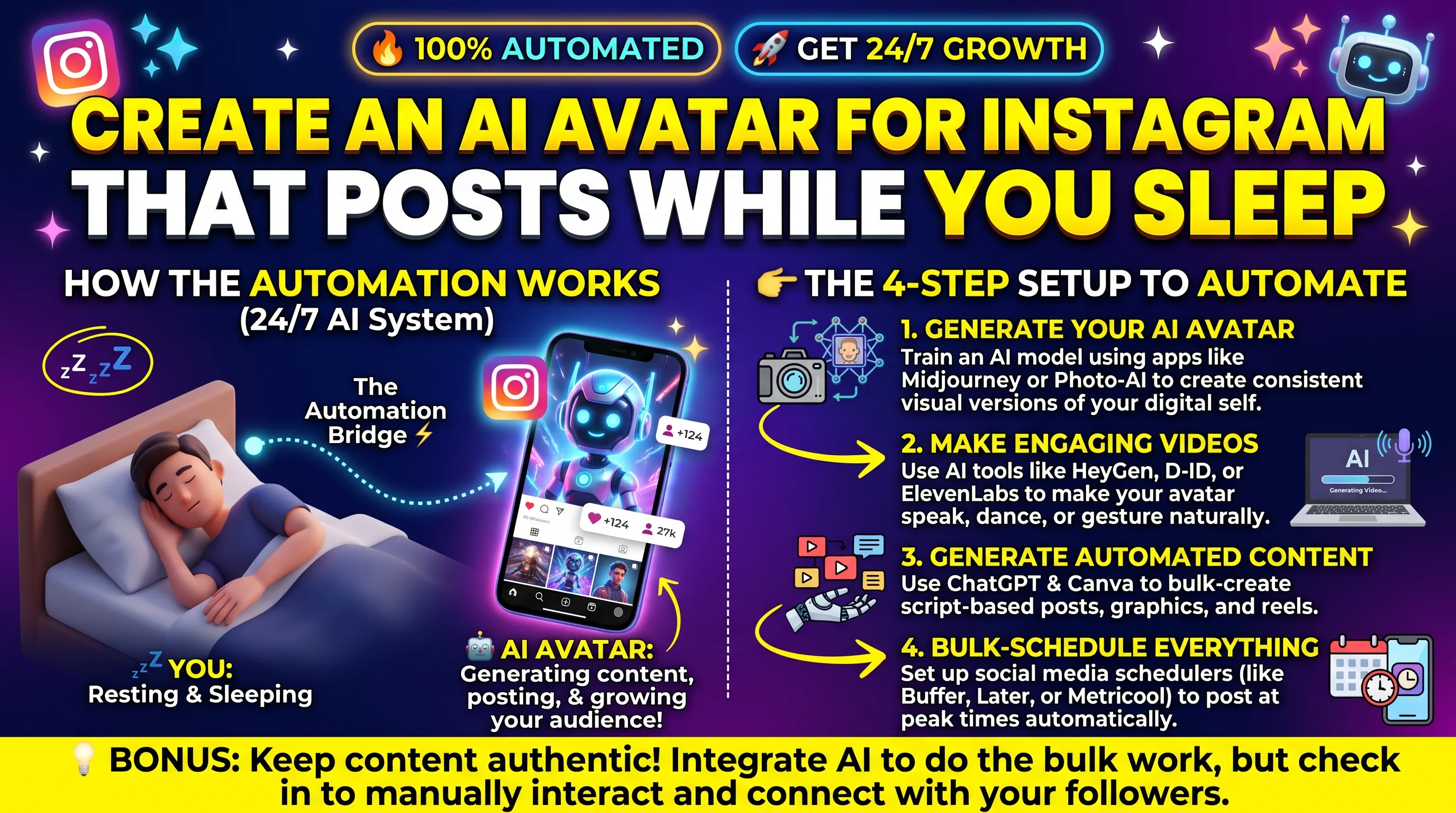
Quick Answer: An AI Avatar is a digital character (based on your likeness or a generic character) that will read a script which you create. Using a tool such as HeyGen/Synthesia/D-ID you create your avatar video. This can then be scheduled using a scheduling tool connected to Instagram. You do not have to do any posting, but you will need to plan, review and approve the content. You should also make sure to state that it is an AI generated post.
This can lead to the misconception that this is a one-click tool that will post whilst you sleep. However, the AI Avatar tools mean you do not need to film yourself and the scheduling tool means you do not need to be awake whilst the content is posted. This means you are no longer performing and posting, but instead planning, scripting and reviewing.
This can save you a lot of time if you are not a fan of being on camera or need to create lots of short explanation videos. However, if not done correctly this can cause issues. Here is how the process works and where the risks come in.
What an AI Avatar Actually Is
There are two main options. The first is a stock avatar. These are generic avatars provided by the tool. This means they can be used by everyone. The second option is a custom avatar (sometimes known as a digital twin). This is created using a real persons video footage with their consent. This will look and sound like the real person. Custom avatars provide a recognisable identity for your brand. Stock avatars are quick to get started with however they will be used by many other accounts which can devalue your unique brand.
The Workflow From Idea to Scheduled Post
Plan
Choose a content pillar and a weekly topic list
Script
Draft short scripts with a writing AI, then edit in your voice
Generate
Turn each script into an avatar video
Review
Watch every video for errors and awkward delivery
Schedule
Queue approved videos in a scheduler for publishing
Setting It Up Step by Step
-
1) Choose a niche and 3-4 topics to focus on. This will give your avatar a clear topic to focus on. If your presenter doesn't have a clear topic, your content will be forgettable.
-
2) Create engaging 30/45 second scripts. Each video should focus on one concept. Start with a hook in your first sentence as your video will be judged in the first few seconds.
-
3) Choose an avatar tool. Create/select your avatar. If you're creating a bespoke avatar using your own footage, make sure you follow the instructions for recording your avatar carefully. The quality of your input will affect the quality of your output.
-
4) Create your videos in bulk. Add captions. Many people watch videos without sound so it's important to have text on screen.
-
5) Check through all of your videos. Make sure they've been pronounced correctly, the facts are correct, lips are synced and everything sounds natural.
-
6) Upload your approved videos into a scheduling tool linked to your Instagram professional account. Schedule them for the coming week.
Tool Categories You Will Use
| Job | Example Tools | What to Check |
|---|---|---|
| Script writing | Claude, ChatGPT | Edit for accuracy and your own voice |
| Avatar video | HeyGen, Synthesia, D-ID | Lip sync quality, languages, commercial licensing, pricing per minute |
| Captions and editing | CapCut, Descript | Accurate auto-captions, vertical export |
| Scheduling | Later, Buffer, Metricool | Reels support, Instagram professional account requirement |
Features and pricing will often change. Always check the website of each tool to ensure you know what is available. Check if you will be able to use it commercially, and whether it will support vertical video for Reels.
Consent, Likeness, and Disclosure
Your avatar should only ever be of yourself or someone who has given clear written consent. Creating an avatar of someone else without their permission is unethical, and could even be illegal depending on where you are. Most avatar platforms require consent to create custom avatars.
Transparency: Instagram have guidelines for AI generated and edited content. They can add labels to content they identify as AI generated. Guidelines and policies are always changing so ensure that you are aware of Instagram’s current guidelines. Being transparent with your audience about using an AI presenter in your video will help build trust. People are much more accepting of AI assisted content if they are told about it, however can feel like they’ve been misled if they find out themselves.
When an AI Avatar Is a Good Fit
Avatars will fit well into educational, explanatory and informative content. They won’t be as suitable for content that relies on personal experiences, feelings and real-time responses. In these situations the audience will expect to see and hear the real person.
Key Takeaways
-
An AI avatar is a digital spokesperson, or a generic or bespoke version of a real person with their permission.
-
The content will not be automatically published. You will need to use scheduling tools so that only approved videos are published. Planning, scripting, editing and scheduling can be done in a simple process.
-
Planning, scripting, editing and scheduling can be done in a simple process. Usually videos will be created on a weekly basis.
-
Only create avatars of yourself, or people who have clearly given consent. Check the commercial terms of each tool.
-
Be transparent with your audience about the use of AI. Follow Instagram's current guidance on AI content.
-
Always edit your videos. Although automation can decrease the time taken to create content, it cannot replace human judgement.
Frequently Asked Questions
Can an AI avatar post to Instagram on its own?
No. The video is created using the avatar tool and scheduled using a scheduling tool which is linked to your Instagram professional account. You are responsible for what is posted.
Do I need to tell my audience a video uses an AI avatar?
Highly recommended. Instagram has AI policies which are continuously developing so it's a good idea to be transparent. You can have a quick statement in your bio or captions about the current Instagram policies.
Is it okay to make an avatar of someone else?
Only with their clear, documented consent. Creating a digital version of a person without permission can violate their rights, platform terms, and in some places the law.
Will Instagram penalize AI avatar videos?
Instagram's algorithm works mostly based on engagement. It will often flag content it finds to be AI generated, but this does not mean you will face any kind of punishment. Content that is low quality and repetitive will generally not do well whatever way it was created.
How much time does this workflow save?
Depending on the person and tool used, the main cost saving comes from not having to film, re-film and edit. There will still be some work involved in strategy, scripting and reviewing. So there will be cost savings but not complete elimination.