Tagged photos sit at an interesting intersection of Instagram's privacy system. Unlike a regular post that an account actively publishes, a tagged photo is content someone else has published about you. This creates a layer of complexity around what is visible to whom and who controls the visibility.
Understanding the rules around tagged photo visibility helps both people who want to see tagged content on other accounts and people who want to control what others can see about them. Here is the complete picture for 2026.
The Private Account Rule: No Access Without Approval
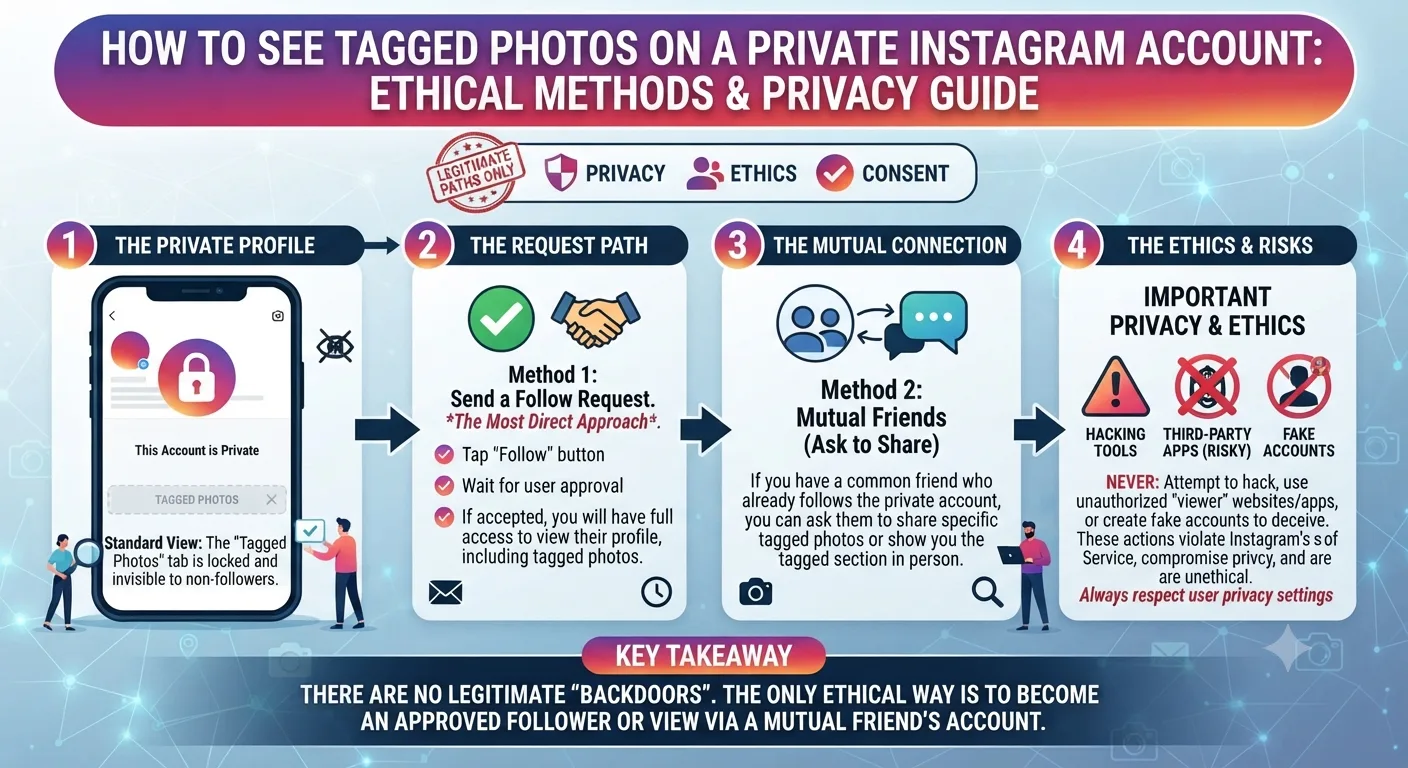
Instagram treats a private account's tagged photos the same way it treats all their content. When an account is set to private, everything associated with that account, including photos they have been tagged in, is hidden from anyone who has not been approved as a follower.
This means even if the person who originally posted the photo has a public account, once they tag a private account in it, the tag connection between that photo and the private profile is not visible to non-followers of the private account.
There is no tool, workaround, or method that bypasses this restriction for private accounts. Instagram's privacy enforcement for tagged content on private accounts is consistent and well-maintained. Any service claiming to show you private account tagged photos is either fabricating data or presenting unrelated content.
What You Can See on a Public Account's Tagged Photos
Public accounts are entirely different. On a public Instagram account, the tagged photos section is accessible to anyone including non-followers and anonymous visitors.
How to View Tagged Photos on a Public Instagram Account
- 1Go to the public account's profile page either through the Instagram app or by typing instagram.com/username in a browser.
- 2Look for the person icon tab on the profile, which is the third tab along the top of their post grid. Tap or click it to open the tagged photos section.
- 3All photos and videos that other accounts have tagged this person in will appear here, provided the account owner has not manually removed them.
- 4Tap any photo to view it in full and see who posted it, the full caption, and any additional tags.
Note that Instagram requires a login to access much of this on the web browser version. If you are not logged in, you may hit a login wall before reaching the tagged photos section. Using an anonymous Instagram viewer tool avoids this restriction for public accounts.
Using an Anonymous Viewer Tool for Public Account Tags
For public accounts, an anonymous story and profile viewer tool lets you browse their tagged content without logging in and without the account owner knowing you visited their profile. The tool retrieves publicly available content through its own server requests, so your identity is never part of the transaction.
This is particularly useful for competitive research where you want to see who is tagging a brand or creator without that account noticing your visits in their analytics. Brand managers routinely use this approach to monitor who mentions or tags competitor accounts in public content.
How Tagged Photo Visibility Is Controlled by the Account Owner
Even public account holders have control over their tagged photo section. Instagram allows account owners to manually approve tagged photos before they appear in their tagged section, which means not every tag is guaranteed to be publicly visible even on public accounts.
If someone with a public account has enabled the manual review setting for tags, photos they have been tagged in will only appear in their tagged section after they approve each one. Photos they have not yet reviewed or have declined will not be visible.
Account owners can also remove individual tagged photos from their tagged section at any time, even if the original post still exists on the tagger's profile.
What to Do If You Want to See Tags on a Private Account You Know
If the private account belongs to someone you know and have a legitimate reason to follow, sending a follow request is the appropriate path. Once they approve your request, you will have access to their full profile including their tagged photos.
If the private account belongs to a public figure or brand that has incorrectly set their profile to private, monitoring for a change in their account status is the only option. Some accounts set themselves to private temporarily and return to public later.
Public account tagged photos: Accessible to everyone including non-followers and anonymous visitors, subject to the account owner's tag approval settings.
Private account tagged photos: Accessible only to approved followers. No tool or method can bypass this restriction because the content is not publicly available at the source.
Can Someone See When You Look at Their Tagged Photos?
Instagram does not notify users when someone views their tagged photo section or looks at individual tagged photos. There is no notification system for profile section browsing of any kind. As with regular post browsing and profile visits, the account owner has no way to see who has visited their tagged section unless you actively engage with a photo through a like or comment.
Key Takeaways
- Tagged photos on private Instagram accounts are completely inaccessible to non-followers. No tool can bypass this because the content is locked at the source.
- Tagged photos on public accounts are visible to anyone including non-followers and anonymous visitors through both Instagram and viewer tools.
- Public account holders can enable manual tag review, which means not all tags are necessarily visible even on public accounts.
- Anonymous viewer tools let you browse public account tagged photos without logging in and without alerting the account owner.
- Instagram does not notify account owners when someone views their tagged photo section.
Frequently Asked Questions
Can you see tagged posts on a private Instagram account?
No. Tagged posts on private accounts are hidden from everyone except approved followers. This is enforced at the platform level and cannot be bypassed by any third-party tool or workaround.
Why can I see a post someone is tagged in but not their tagged section?
This happens when a public account posts a photo tagging a private account. The photo is visible on the poster's public profile, but the tagged section on the private account's profile is locked. The photo exists in two places and each location has its own visibility rules.
Does Instagram notify you when someone looks at your tagged photos?
No. Instagram does not send any notification when someone browses your tagged photo section or views individual tagged photos. Only active engagement through likes or comments creates a visible record of the visit.
Can I hide my tagged photos from a specific person without blocking them?
Not with granular control for individual users. You can set your entire account to private, enable manual tag review so you control what appears in your tagged section, or remove specific tagged photos from your tagged section. There is no feature to hide the tagged section from a specific person while keeping it visible to others on a public account.
If someone untags themselves from a photo, does the photo disappear?
No. Untagging removes the connection between the photo and the person's profile, so the photo no longer appears in their tagged section and searching their username does not surface it. But the original photo stays on the poster's profile unchanged. Only the poster can delete the photo entirely.