Most Instagram users have authorized far more third-party apps than they remember. A photo editing app tested once in 2022. A follower analytics tool used for a single campaign. A quiz app that requested login access years ago. Each of these authorizations remains active indefinitely unless manually revoked, meaning they retain whatever level of access you originally granted, regardless of whether you have opened the app since.
Here is a complete process for auditing and cleaning up these old connections, plus what to know about the data these apps may have already collected.
Why Old App Authorizations Are a Real Privacy Concern
When you authorize a third-party app to connect with your Instagram account, you grant it a specific set of permissions defined at that time, which might include reading your profile data, accessing your posts, or in some cases posting on your behalf. This authorization does not expire automatically. It remains active until you manually revoke it or Instagram's own security systems detect and remove a connection due to that app's own policy violations.
Over years of using Instagram, most active users accumulate a surprising number of these connections, many from apps they used once and forgot about entirely. Each active connection represents a potential access point to your account data, and reducing this surface area is a straightforward, low-effort privacy improvement.
How to Find and Review Your Connected Apps
Complete Connected Apps Audit Process
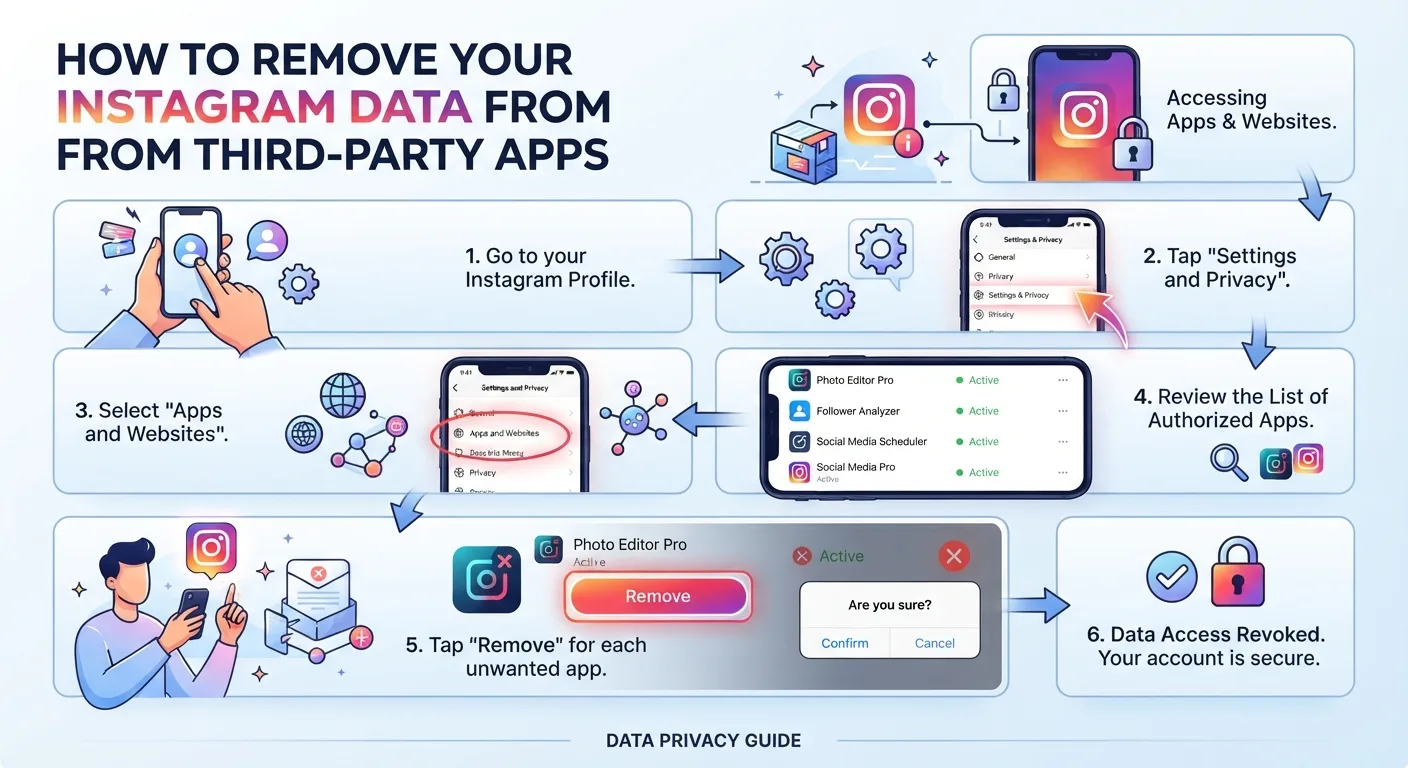
- 1Open Instagram and go to your profile, then tap the three lines in the top right corner to open the menu.
- 2Select Settings and Privacy, then Accounts Center.
- 3Tap Password and Security, then select Apps and Websites, sometimes labeled Connected Apps and Websites depending on your app version.
- 4Review the full list of active connections. This list often includes apps used for single sign-on, analytics tools, scheduling apps, and any third-party service you have ever authorized to access your account.
- 5For each app you do not currently and actively use, tap it and select Remove to revoke its access to your account immediately.
- 6For apps you do still use, review the specific permissions granted and confirm they align with what the app genuinely needs to function, removing any that seem excessive for the app's actual purpose.
What Removing an App's Access Does and Does Not Do
Removing an app's connection through Accounts Center immediately revokes that app's ability to access your Instagram account going forward. It stops any further data collection, posting ability, or account access that the authorization previously permitted.
Removing the connection does not delete any data that app has already collected during the period it had access. If a follower analytics tool captured your follower list data over the two years you had it connected, revoking access today stops future collection but does not retroactively delete their existing copy of that historical data.
Red Flags to Look for When Reviewing Your List
Pay particular attention to any app names you do not recognize at all, since these may represent very old authorizations, forgotten quiz or personality test apps, or in rare cases indicate an authorization you did not actually make, which could suggest an account security issue worth investigating further.
Apps with unusually broad permissions relative to their apparent function are also worth scrutinizing. A simple photo filter app that has been granted permission to post on your behalf or access your follower list has broader access than its function would typically require, which is worth questioning and likely revoking.
How Often to Perform This Audit
A quarterly review is a reasonable cadence for most active Instagram users, particularly those who regularly try new apps, tools, or services that request Instagram integration. Users who rarely connect new apps can perform this review less frequently, perhaps twice yearly, while still catching the accumulation of forgotten connections before it becomes extensive.
Performing this review immediately after using any new third-party tool for a single specific purpose, such as a one-time analytics report or a temporary scheduling test, is also good practice, revoking access as soon as the specific need has been fulfilled rather than leaving the connection active indefinitely by default.
Key Takeaways
- Third-party app authorizations on Instagram remain active indefinitely until manually revoked, regardless of how long ago or how briefly you actually used the app.
- Reviewing and removing old connections is done through Accounts Center under Password and Security, then Apps and Websites.
- Revoking an app's access stops future data collection and account access immediately but does not delete data the app has already collected during its access period.
- Requesting deletion of previously collected data requires a separate request directly to the app, typically through their privacy policy's data deletion process.
- Unrecognized app names or apps with permissions broader than their apparent function warrant particular scrutiny and are strong candidates for removal.
- A quarterly review cadence is reasonable for most active users, with immediate revocation recommended after using any app for a single, temporary purpose.
Frequently Asked Questions
How do I see which apps have access to my Instagram account?
Go to Settings and Privacy, then Accounts Center, then Password and Security, then Apps and Websites. This shows a complete list of every third-party app or website currently authorized to access your account, along with the specific permissions each one has been granted.
Does removing an app's access delete data it already collected?
No. Revoking access through Instagram's Accounts Center stops future data collection but does not delete data the app already gathered while it had access. To request deletion of previously collected data, you need to contact the specific app directly through their own privacy policy's data deletion process.
Is it safe to remove access from apps I do not recognize?
Yes, removing access is always the safer choice for any app you do not actively use or recognize. There is no downside to revoking access from an app you are not using, and doing so reduces your account's overall exposure to potential data misuse or security vulnerabilities in that third-party service.
Will removing a connected app affect my Instagram account itself?
No. Removing a third-party app's access through Accounts Center only affects that specific app's connection to your account. Your Instagram profile, posts, followers, and account settings remain completely unaffected. The only change is that the removed app can no longer access or interact with your Instagram account going forward.
How often should I check my connected apps list?
A quarterly review is reasonable for most active Instagram users, particularly those who frequently try new tools or apps that request Instagram integration. Users who rarely connect new third-party services can review less frequently, though checking at least twice per year is a reasonable minimum to catch accumulated forgotten connections.