Instagram want you to sign in. Every year there is a little more friction with logging in. Pop-ups, blurry images and prompts after a few seconds of scrolling. This is so they can make money from their accounts and the data they provide. Many people create accounts that they didn’t want to as they just wanted to view a public profile, check out a company or click on a link.
The good news is that public content is still public! Below you will find a breakdown of how Instagram works for you without signing in, why it isn’t the best and what workarounds actually work.
What a Logged-Out Visitor Can Usually See
Instagram frequently changes the experience on its site when you're not logged in. Depending on your device, country, and week, it can vary. Generally though, you'll see the profile picture, bio and stats of a public profile when you visit a link like instagram.com/username in your browser. If you visit a direct link to a single public post or Reel it will often work too (until Instagram decide to ask you).
| Content Type | Direct Browser Visit (Logged Out) | Anonymous Viewer Tool |
|---|---|---|
| Public profile basics (photo, bio, counts) | Usually visible | Visible |
| Public post grid | Partial, often interrupted by login prompt | Visible |
| Single public post or Reel via direct link | Often works, may prompt login | Visible |
| Stories from public accounts | Generally requires login | Visible while active |
| Highlights from public accounts | Generally requires login | Visible |
| Private account content | Not accessible | Not accessible |
| Direct messages | Not accessible | Not accessible |
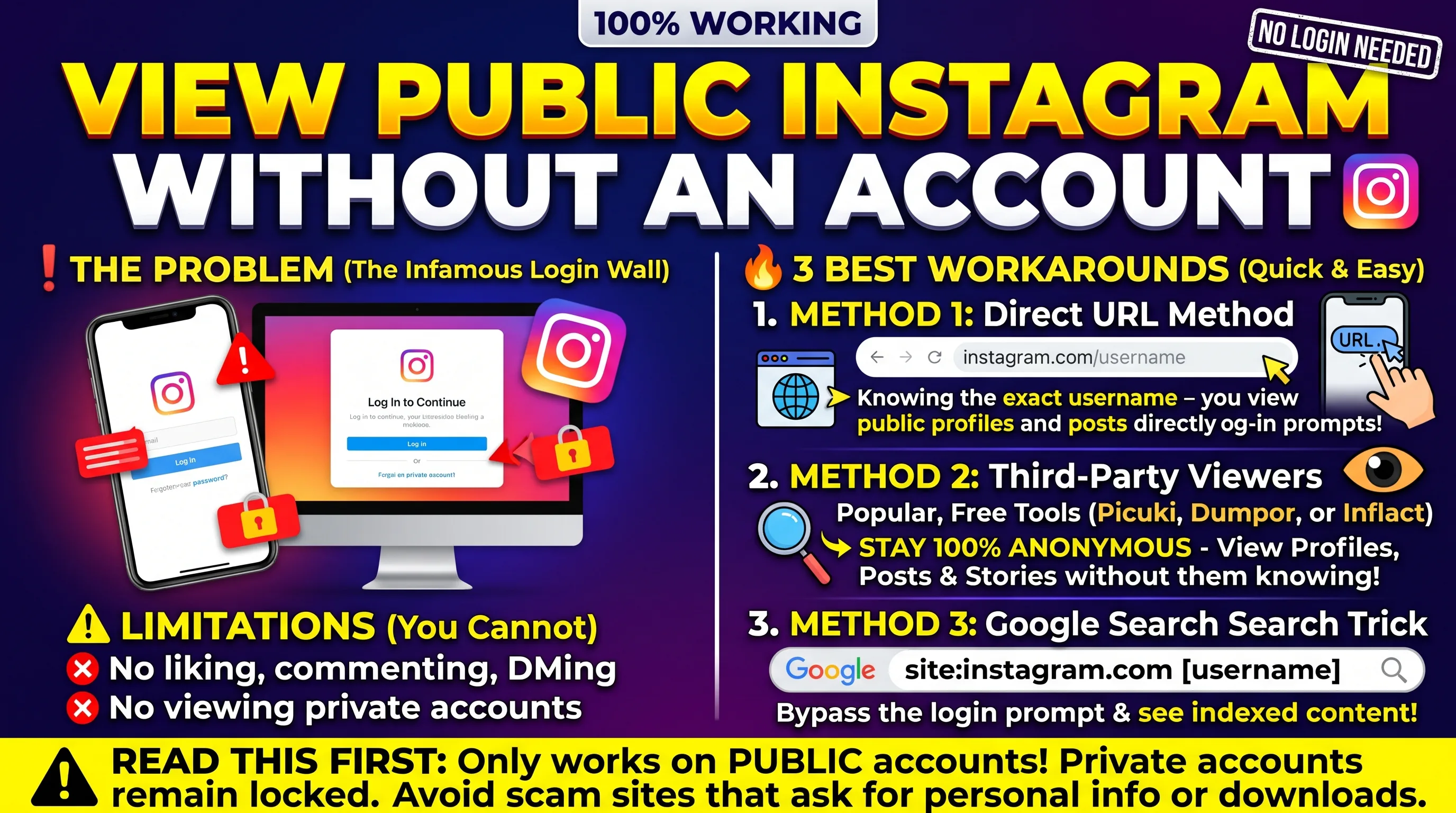
Workaround 1: Open the Link Directly Instead of Searching
The biggest locked behind login features of Instagram are its search and explore features. If you go to type a known profile or post URL into your browser you are much less likely to encounter a barrier. If you receive a link to Instagram, opening it in a private or incognito browser window will often allow you to go further with the URL.
Workaround 2: Use a Search Engine
The search engines do crawl some of the Instagram content. If you search for a username and Instagram you will usually get the profile page and a few recent public posts. The results can be inconsistent as Stories will not show up due to them expiring, and there may not be any new posts as they may not have been crawled yet. This is useful for confirming an account exists and seeing what it generally posts, but is not great for browsing.
Workaround 3: Use an Anonymous Instagram Viewer Tool
The most complete option for viewing public content anonymously is by using an anonymous viewer tool. This makes a request to Instagram directly from your own server. You will never log in and Instagram will never be sent any request that can be traced back to you.
How to Use an Anonymous Viewer Without an Account
-
1Open up an anonymous Instagram viewer tool. All you need to do is open it up in your browser (no install or sign up required).
-
2Enter the username of the public account you wish to view.
-
3Browse through their profile, posts, Reels, active stories and highlights.
-
4Download any content you want to keep.
What No Workaround Can Do
Private accounts remain private. If the account owner has their profile set to private, then the content will not be shown to anybody who isn’t an approved follower. There is no way to access content that Instagram doesn’t want you to see. Any website claiming to give you access to private photos, stories or DMs are either lying or trying to steal your login details.
Don’t risk your safety. Never enter your Instagram username and password on any websites claiming to give you access to private content. Legitimate anonymous viewers won’t ask you for your login details as they don’t need them to show you public content.
Does Viewing Without an Account Leave a Trace?
Instagram will never tell you who has viewed your profile. If you are viewing it whilst logged out or using an anonymous tool, then your name will not show up on any of the lists. However, you may still be recorded in normal web traffic logs, for example, your IP address in a server log. This is the same as if you visited any website.
Key Takeaways
-
Public posts on Instagram can be viewed without an account, however it is increasingly common to be prompted to log in.
-
Typically you will be able to view a profile or post by opening a direct link in a private browser window.
-
Some public profiles and posts will appear in search engines, however stories will never appear. New content may not always appear.
-
The best option to view public posts, reels, stories and highlights is to use the anonymous viewer tool. This will give you the most comprehensive view.
-
Private accounts and DMs cannot be viewed using any methods. Be cautious of sites which claim otherwise.
Frequently Asked Questions
Can I look at someone's Instagram without having an account?
Yes, if their account is public. You can open their profile link in a browser or use an anonymous viewer tool. If the account is private, you cannot see its content without the owner's approval.
Why does Instagram keep asking me to log in?
Instagram restricts browsing whilst you are not logged in to encourage users to create an account. When logged in, data is generated which helps Instagram's advertising business. Prompts will usually be shown earlier when using features such as stories, search and explore rather than just visiting one profile or post.
Will the account owner know I viewed their profile?
No. Instagram will not tell you who viewed your profile. If someone views your profile whilst they are not logged in or anonymous then there will be no record of them in any lists. Only people who view your story whilst logged in will appear in your story viewer list.
Can I see stories without an account?
Not reliably through a direct browser visit, since stories generally require a login. Anonymous viewer tools can display active stories from public accounts without you logging in.
Is it legal to view public Instagram content without an account?
Generally it is legal to view public content. Using a third party viewer could be in breach of the Instagram Terms of Service but this would be a breach of contract and not a legal issue.