Quick Answer: To find fake Instagram accounts using your photos, try a reverse image search on Google Images and TinEye with your most distinctive photos. Search Instagram directly for variations of your name and username. Report impersonator accounts to Instagram and take detailed notes. File a copyright infringement (DMCA) complaint if your photos were used without permission.
Fake Instagram accounts using real people's photos are much more common than most people realize. Fake accounts typically serve one or more of the following purposes: romance scam (financial exploitation after a relationship is established), brand impersonation (fraudulent sales or reputation sabotage), harassment by people known to the target, and follower farming (bot accounts using attractive photos to grow their audience).
Real people discovering that their identity is being used without permission on Instagram is deeply concerning. Here is how to find those accounts, properly document them, and get them taken down.
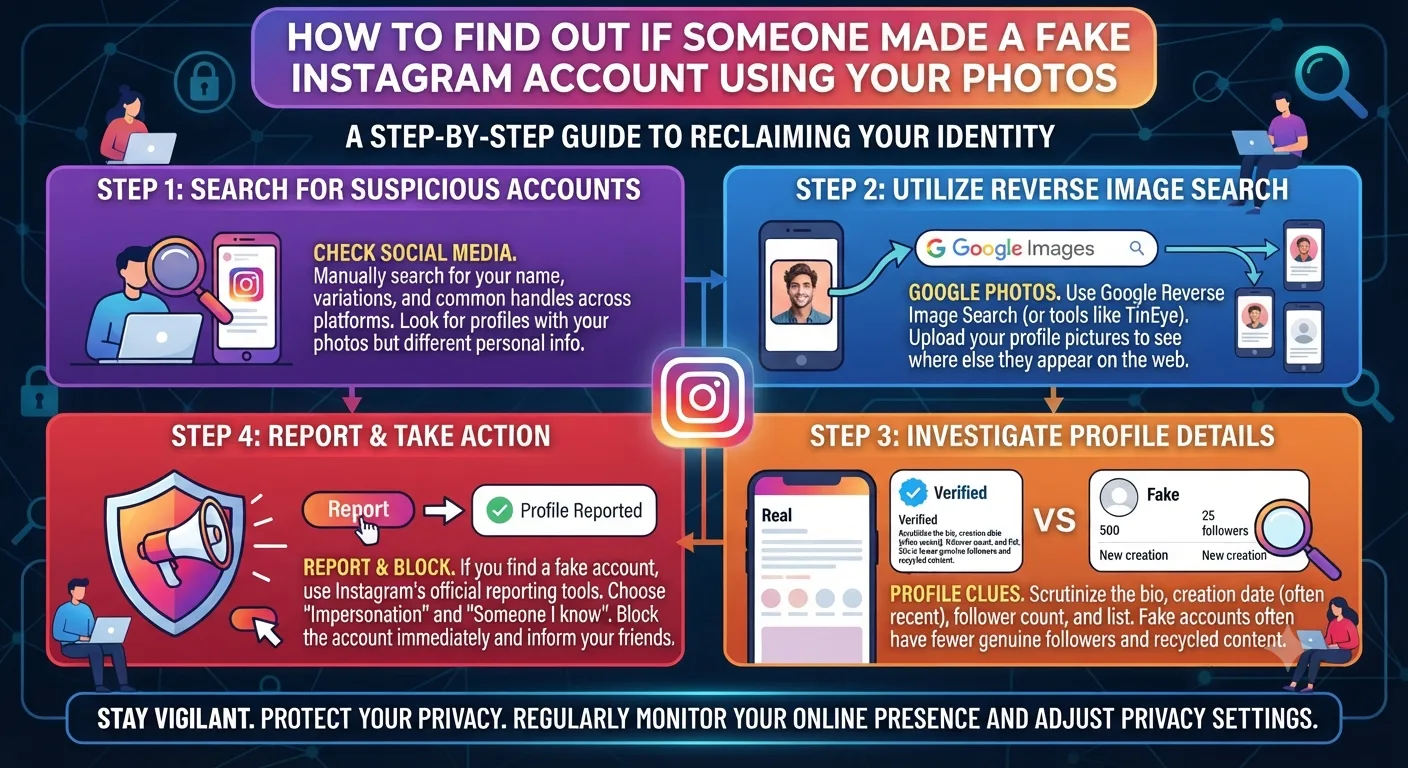
Method 1: Reverse Image Search
Reverse image search is typically the best method for finding fake Instagram accounts using your photos
You provide the image and the search engine finds all the places online where the same or similar image appears.
How to Run a Reverse Image Search for Your Instagram Photos
Save a few of your most distinctive Instagram photos to your device. The photos that appear on your own Instagram profile, especially your profile picture and other frequently shared photos
Go to images.google.com on your desktop browser and click the camera icon in the search bar to upload an image.
Upload one of the photos and look through the search results. Google will display every page where the same or a similar photo appears, including social media accounts, dating profiles, and scammer databases.
Repeat the search process on TinEye.com, which has a different index and sometimes finds different results than Google.
For thoroughness, perform the same search on Bing Visual Search and Yandex Images. Search engines have different coverage, with Yandex typically having the strongest coverage for eastern European and Russian language content.
Save all the results you find with a screenshot that includes the page's URL, date, and the content itself.
Method 2: Direct Instagram Search
Now search Instagram directly for accounts impersonating you. Search for variations of your name, your username, and any other alternate names or usernames you might have used.
Watch for accounts with similar names that have an unusually high number of followers for the amount of posts or recently created accounts with suspicious follower / following ratios, similar-looking photos from your own Instagram account, or names that are very similar to yours.
Search for accounts that might be following your followers. If the impersonating account is a romance scammer, they will often follow people you follow or people who follow you, as those are the people most likely to believe a "private" Instagram account is legitimate.
Warning Signs That an Account Is Fake
! Someone using one of your photos as their profile picture but with a slightly different username and name than your own Instagram account.
! An account with a surprisingly small number of posts and a very high number of followers or a recently created account with an unrealistically high or low follower / following ratio.
! Posts using your photos but with captions in a style or language different than you would use.
! An account following people from your network or people who follow you, indicating that the account is attempting to impersonate you specifically to people who know you.
! Messages from people asking if you set up a second account or claiming that they received a message from an impersonator account pretending to be you.
! A bio that includes contact information, a link to another website, or asks for money that you would never ask for.
How to Report a Fake Account on Instagram
Reporting an Impersonation Account
Take thorough screenshots of the fake account, including a picture of the profile, the bio, several of the posts, and the follower and following lists. This documentation is critical in case the fake account is deleted before Instagram takes action.
Go to the fake account's profile on Instagram and click the three dots in the upper-right corner of the screen.
Click Report and then "It's pretending to be me or someone else."
Select "myself" as the person being impersonated and complete the report process. Instagram may ask for additional information, including a government-issued photo ID, to confirm that you are reporting the correct account.
If you are reporting an impersonating account on behalf of someone else who cannot do so, select the relationship option and provide the information Instagram asks for.
Beyond the Instagram Report: Additional Actions
Instagram's review of the reported account can take days or even weeks, and there is no guarantee of removal, even if the evidence is overwhelming. There are additional steps you can take beyond the Instagram report that increase the likelihood of rapid removal and provide protection in case the fake account is using your photos to scam people.
File a DMCA copyright takedown notice if the fake account is using photos that you own the copyright to.
Your photos are copyrighted as soon as you create them, so this is always an option. The DMCA takedown notice is typically much more effective than the impersonation report, as it forces Instagram to act more quickly to protect their intellectual property.
The Instagram DMCA submission form can be found in their Help Center under Intellectual Property.
Alert your followers about the fake account. Make a post or story about the impersonating account so that your followers know not to engage with it or send money to anyone claiming to be you. It will also generate additional reports to Instagram for quick removal.
If the fake account is being used for financial fraud: Document everything and report it to your local law enforcement. Fraudulent activity using a fake Instagram account should be reported to local authorities in addition to the impersonation report. If money has already been transferred to the fake account, the victims should report it to their local law enforcement as well as the relevant consumer protection agency for their country.
Your report to law enforcement serves as a formal notice and may tie the fake account to a larger fraud ring if there are other similar accounts.
Key Takeaways
Reverse image search on Google Images, TinEye, Yandex, and Bing Visual Search typically uncovers the most fake Instagram accounts using your photos.
Searching Instagram directly for name and username variations typically finds impersonating accounts within Instagram before they appear in search engines.
A DMCA copyright takedown notice for your original photos used on the fake account without permission often produces faster results than just the impersonation report.
Alerting your followers about the fake account protects them and generates multiple reports that speed up the review process.
If the fake Instagram account is being used for financial fraud, report it to your local law enforcement as well as Instagram. This creates a paper trail and may tie the fake account to a larger fraud operation.
Document everything before reporting an impersonating account, as Instagram accounts can be deleted before the review is complete.
Frequently Asked Questions
How do I find a fake Instagram account using my photos?
Run a reverse image search on Google Images and TinEye with your most distinctive photos. Search Instagram directly for name and username variations. Watch for messages from followers asking about a second account. Set up a Google Alert for your name to catch mentions that appear on external platforms that might be tied to a fake account.
How long does Instagram take to remove a fake account?
Review time varies from 24 hours to multiple weeks, depending on the volume of reports and the strength of the evidence. Filing both an impersonation report and a DMCA copyright notice typically produces faster results than either one alone. Getting multiple reports from your followers about the same account also expedites the review process.
Can Instagram stop someone from using my photos?
Instagram can remove content that violates their policies, including impersonation and copyright infringement. They cannot prevent someone from taking and using your photos before they do so. Lowering the resolution of photos you post publicly, using visible watermarks, and making your account private are the only ways to reduce the risk of photos being used without permission. Prevention is not absolute for public accounts.
What should I do if followers are receiving messages from someone pretending to be me?
Post an immediate alert on your stories and feed. Ask followers to screenshot the messages and block the impersonator. Report the fake account yourself and encourage followers to do the same. If money has been requested or transferred, this should be reported to local authorities in addition to the Instagram report.
Is using someone else's photos on Instagram illegal?
It is illegal on multiple fronts. Using another person's photos to impersonate them violates Instagram's terms of service and may be a violation of identity theft laws, depending on the jurisdiction. Using photos without the permission of the copyright owner is a copyright violation, regardless of whether the photos are used to impersonate someone. If the fake account is being used to perpetrate a fraud, criminal laws also apply in virtually every jurisdiction.