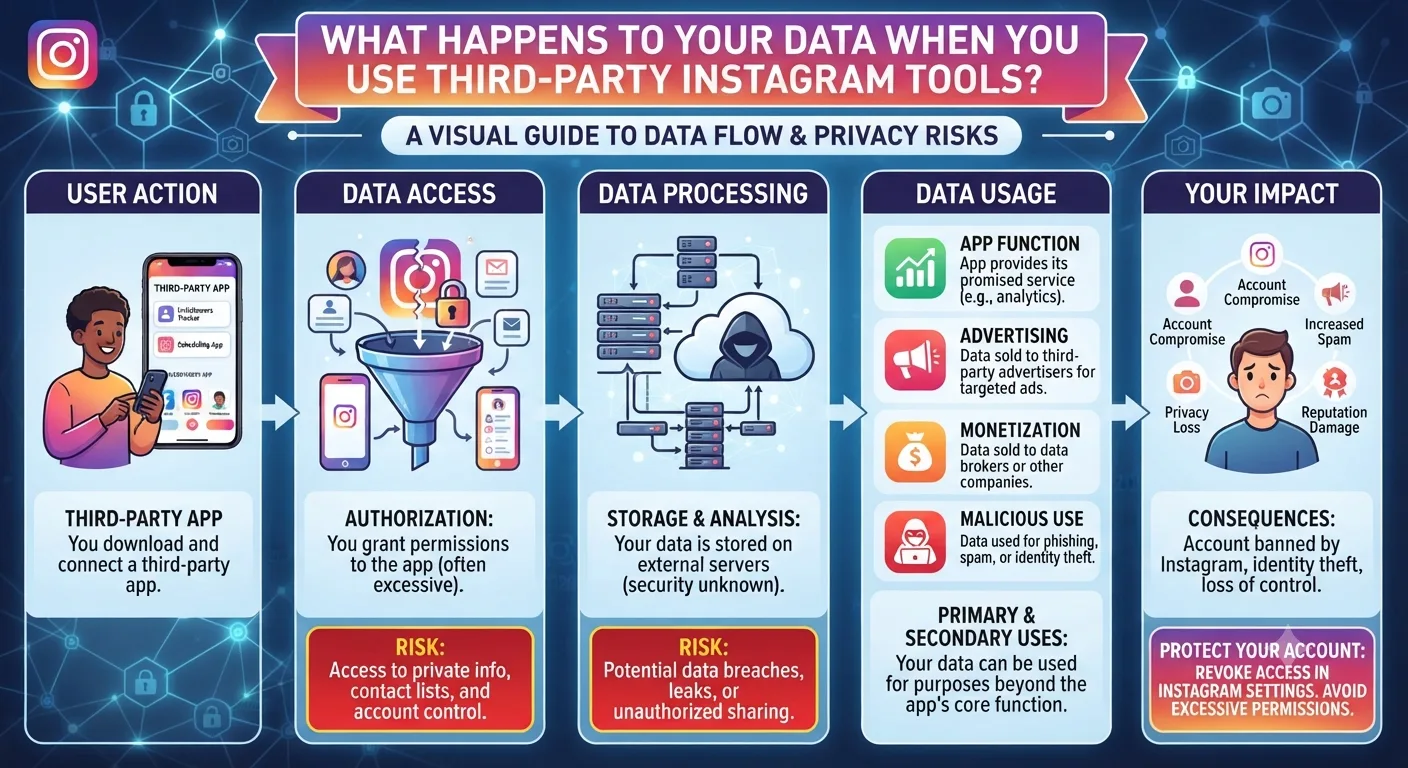
The phrase third-party Instagram tool covers an extremely wide range of products with very different data practices. A Meta-authorized scheduling tool, an anonymous story viewer, and a sketchy unfollow tracker app are all technically third-party Instagram tools. Lumping them together as equally risky or equally safe is wrong in both directions.
This guide breaks down the data landscape honestly by tool type, explains what risks are real versus overstated, and gives you a clear framework for evaluating any tool before you connect it to your account.
Tool Type 1: Meta-Authorized API Tools
Tools like Later, Buffer, Hootsuite, and Metricool connect to your Instagram account through Meta's official developer API. This requires you to authorize the connection through your Instagram or Accounts Center settings rather than by entering your password into the tool directly.
When you authorize an API connection, you are granting the tool specific, defined permissions. You can see exactly what these permissions are at the point of authorization. They typically include the ability to read your post data, post content on your behalf, and read your basic profile information. They do not include access to your password, your DMs, or data from accounts you do not own.
These tools are audited by Meta as part of their API access approval process. Meta can revoke their API access if they misuse data. This does not make them zero-risk, but it means they operate under formal constraints that unapproved tools do not have.
Tool Type 2: Anonymous Viewer Tools
Anonymous Instagram story and profile viewer tools operate on a fundamentally different data model. Because they require no login, no account connection, and no personal information from the user, they collect no personal data from the viewer at all.
When you enter a username into an anonymous viewer tool, the tool fetches publicly available content from Instagram through its own server. From a data perspective, all the tool knows is that someone with your IP address searched for a specific public username. It has no connection to your identity, your Instagram account, or any personal profile.
This is why anonymous viewer tools are the lowest-risk tool type for user data. The absence of a login requirement is not a limitation. It is the feature that makes them data-safe by design.
| Tool Type | Login Required | Data Risk Level | What They Can Access |
|---|---|---|---|
| Meta-authorized scheduling tools | OAuth connection (no password) | Low | Your posts, profile, engagement data |
| Anonymous viewer tools | None required | Very Low | Publicly available content only. No account data. |
| Unauthorized follower tracker apps | Often your IG password | High | Full account access if password is shared |
| Sketchy insight or analytics apps | Varies. Often password. | High to Very High | Potentially full account. Credential theft risk. |
| Browser extensions for Instagram | Access to your browser session | Medium | Can read what your logged-in session sees |
Tool Type 3: Unauthorized Tools Requesting Your Password
Any tool that asks you to enter your actual Instagram username and password is operating outside of Instagram's official authorization system. This is the highest-risk category and deserves a clear explanation of why.
When you hand a third-party tool your Instagram password, you are giving it complete access to your account. Not the limited, defined access that API tools receive. Full access. The tool can read your DMs, post content, follow and unfollow accounts, change your password, or do anything you can do while logged in. You have no visibility into what the tool is actually doing with this access in the background.
Many of these tools also store the credentials they collect on their own servers. If those servers are breached, your Instagram login is exposed. Some of these apps are built specifically to harvest credentials from people who believe they are getting a useful feature in exchange.
What to Check Before Using Any Instagram Tool
Before authorizing or using any new tool, a quick checklist makes the evaluation process fast and consistent.
- Does it ask for your Instagram password? If yes, do not proceed.
- Is it listed in Meta's official partner directory or available in the App Store or Google Play with verifiable developer information?
- Does it have a published privacy policy that explains what data it collects, how long it is retained, and whether it is shared with third parties?
- Can you find credible user reviews from a recognizable source rather than only reviews on the tool's own website?
- Does it request only the permissions it actually needs? A scheduling tool does not need access to your DMs. Be suspicious of over-broad permission requests.
How to Review and Revoke Tool Access You Have Already Granted
If you have connected tools to your Instagram account in the past and are not sure what they can access, reviewing and cleaning up old authorizations is a worthwhile security step.
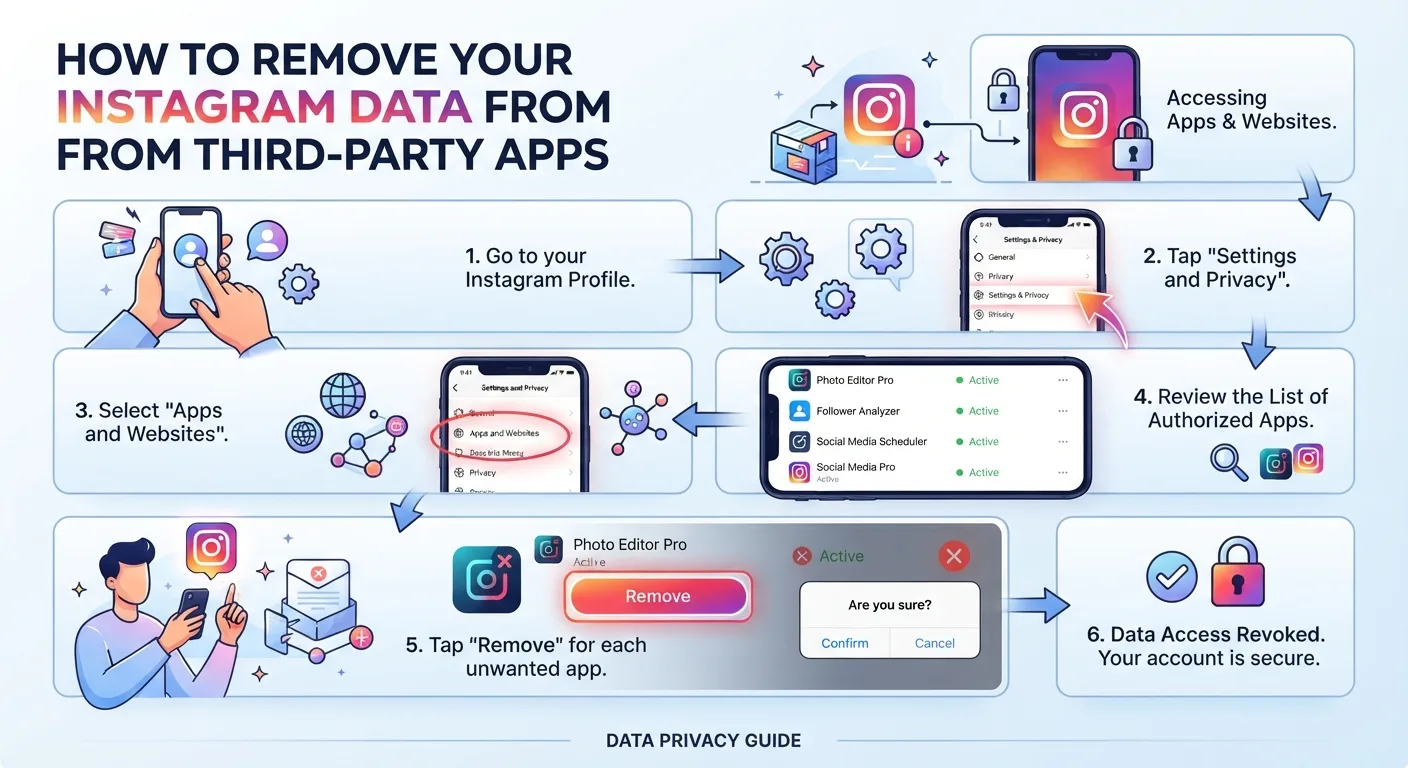
How to Review Connected Apps
- 1Open Instagram and go to Settings and Privacy.
- 2Tap Accounts Center, then Password and Security.
- 3Select Connected Apps and Websites.
- 4Review the list of active app connections. Tap any you do not recognize or no longer use.
- 5Select Remove to revoke the app's access to your account. The revocation takes effect immediately.
Key Takeaways
- Third-party Instagram tools carry very different risk levels depending on their type. Treating all of them as equally safe or equally risky leads to poor decisions in both directions.
- Meta-authorized API tools like Later and Buffer operate under formal data constraints and use secure OAuth connections rather than password sharing.
- Anonymous viewer tools are the lowest-risk category because they require no login and collect no personal account data by design.
- Any tool requesting your Instagram password is operating outside official channels and carries the highest risk of credential theft and unauthorized account access.
- Reviewing and revoking old app connections through Accounts Center is a practical security step that removes access you may have forgotten you granted.
- A published privacy policy, App Store availability, and the absence of a password request are the three most important signals of a trustworthy tool.
Frequently Asked Questions
Is it safe to connect a scheduling tool to my Instagram account?
Yes, for Meta-authorized scheduling tools like Later, Buffer, Metricool, and Hootsuite. These connect through Instagram's official API via a secure OAuth flow that never requires your password and grants only the specific permissions needed for scheduling and analytics. Read each tool's privacy policy before connecting to understand how they handle your account data.
Can a third-party tool post on my Instagram without me knowing?
Yes, if you have granted a tool posting permissions and it is acting in a way you did not intend. This is why reviewing active app connections and revoking access to tools you no longer use is important. Authorized scheduling tools that you are actively using will post according to the schedule you have set. Unauthorized tools with password access can theoretically post anything at any time.
Does using an anonymous Instagram viewer tool risk my personal data?
No. Anonymous viewer tools require no login and no personal information. They access publicly available content through their own servers. The only information associated with your use is your IP address, the same information shared with any website you visit. No account data, no credentials, and no Instagram-connected information is involved.
What should I do if I already gave my Instagram password to a third-party app?
Change your Instagram password immediately through Settings and Privacy in Instagram or through Accounts Center. Also revoke the app's access through Connected Apps and Websites. Enable two-factor authentication if you have not already done so. Check your account's login activity for any unfamiliar sessions and terminate them.
Can Instagram ban my account for using third-party tools?
Instagram can restrict or ban accounts that use unauthorized tools that violate their Terms of Service. Using Meta-authorized tools like scheduling apps carries no ban risk since they operate within Instagram's official developer program. Anonymous viewer tools that require no account connection also carry no ban risk because they are not connected to your account in any way.