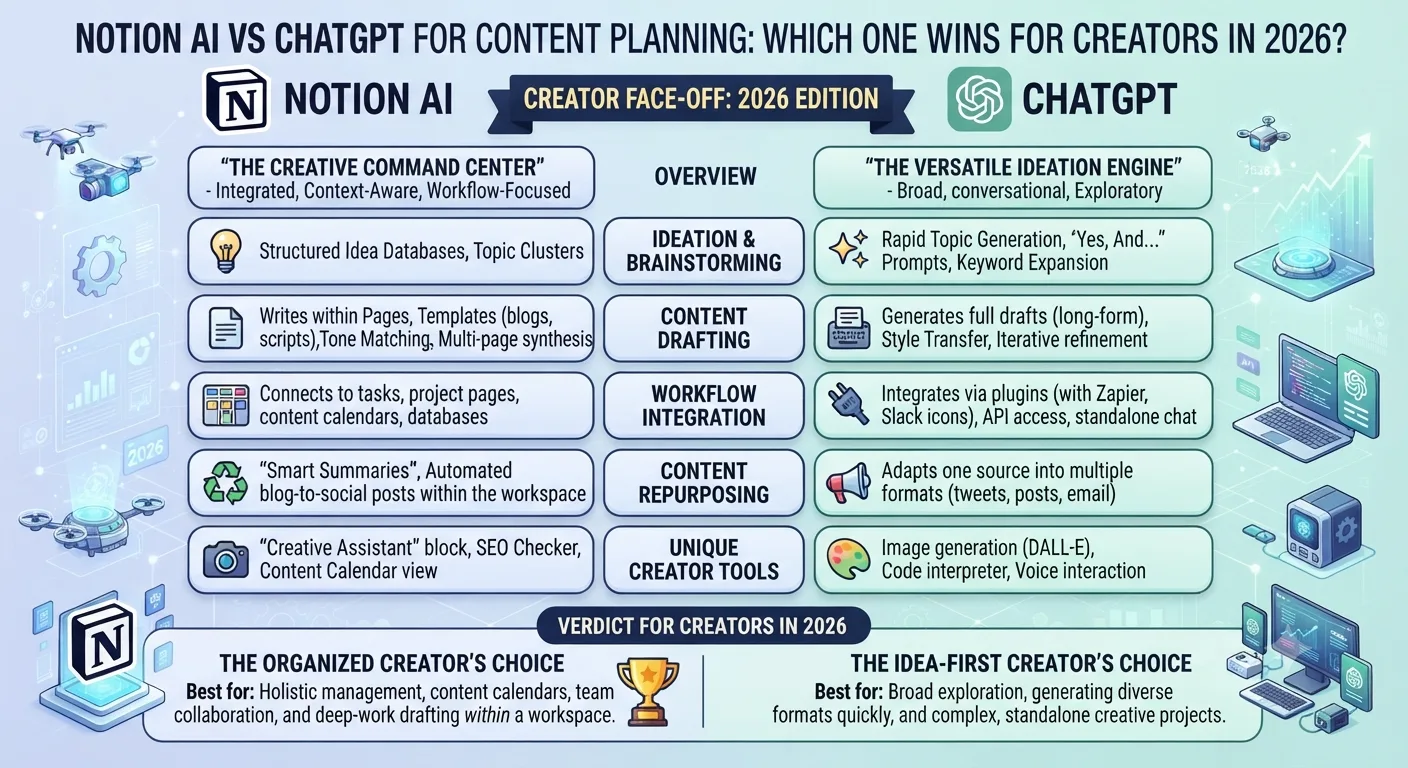
Both Notion AI and ChatGPT are powered by large language models and can help with content planning. But they approach the problem from completely different directions. Notion AI works inside your workspace to help you organize, summarize, and refine what is already there. ChatGPT is a blank canvas that generates new content from scratch.
This distinction sounds simple but it has significant implications for how each tool fits into a real content workflow. Here is a thorough, use-case-by-use-case breakdown so you can make an informed decision without wasting money on the wrong tool.
What Notion AI Does Well
Notion AI is embedded directly into the Notion workspace, which means it works with context you have already built. If you have a database of content ideas, a calendar of planned posts, or a document of brand guidelines, Notion AI can read that context and help you work within it.
Organizing a Content Calendar
If you already use Notion to manage your content calendar, the AI layer makes it significantly faster to organize, tag, filter, and restructure your existing data. You can ask it to sort your ideas by content pillar, flag gaps in your posting schedule, or summarize a cluster of ideas into a coherent weekly theme. It does this work within your actual database rather than in a separate chat window.
Summarizing and Repurposing Existing Content
Notion AI is particularly strong at working with content you have already written. You can paste in a long blog post and ask it to extract five Instagram caption ideas. You can summarize a month's worth of notes into a content brief. It reads what is in your workspace and transforms it without you needing to copy and paste into an external tool.
Editing and Refining Drafts
The editing features in Notion AI are genuinely useful. You can highlight any text in a Notion document and ask the AI to make it shorter, change the tone, fix grammar, or translate it. For creators who draft directly in Notion, this inline editing is faster than switching to a separate tool.
What ChatGPT Does Well
ChatGPT operates as a standalone conversation interface. It has no connection to your existing documents or workspace unless you manually paste content into the chat. What it lacks in workspace integration it more than makes up for in raw generation capability.
Generating Content Ideas at Scale
Ask ChatGPT to give you 30 Instagram content ideas for a fitness brand targeting women over 40, and it will produce a structured, varied list in under 30 seconds. The breadth and creativity of its ideation output is significantly stronger than Notion AI because it is drawing from a much larger training base and has no workspace constraints limiting its scope.
Writing First Drafts
ChatGPT is faster and more flexible for writing full-length first drafts of captions, blog posts, email sequences, and video scripts. You can give it a topic, a tone, an audience description, and a length target and it will produce a complete draft. Notion AI can write too, but its output quality drops noticeably on longer or more structured pieces.
Building Custom Content Frameworks
ChatGPT is excellent at helping you build repeatable content frameworks. Ask it to create a 30-day content calendar for an Instagram account in a specific niche with four posts per day across four pillars, and it will produce a structured, workable plan you can then import into Notion and refine with Notion AI.
Head-to-Head Verdict by Use Case
| Use Case | Notion AI | ChatGPT | Winner |
|---|---|---|---|
| Organizing an existing content calendar | Excellent — works inside your database | Limited — no workspace access | Notion AI |
| Generating 30+ fresh content ideas | Moderate — works but limited creativity | Excellent — fast and varied output | ChatGPT |
| Writing a full caption from scratch | Good for short captions | Excellent — handles any length and tone | ChatGPT |
| Summarizing or repurposing existing content | Excellent — reads your Notion documents directly | Good — requires manual pasting | Notion AI |
| Building a content calendar from scratch | Moderate — good structure, weaker ideas | Excellent — creates full structured plans | ChatGPT |
| Editing and refining a draft inline | Excellent — highlights and edits in place | Good — requires switching tabs | Notion AI |
| Price for solo creators | $10/mo (Notion Plus with AI) | $20/mo (ChatGPT Plus) | Notion AI |
The Recommended Workflow: Use Both Together
The most effective content planning setup in 2026 uses ChatGPT and Notion AI in sequence rather than choosing between them. Use ChatGPT at the front of your workflow for ideation and first drafts where its generation capability shines. Then move your content into Notion where Notion AI handles organization, editing, and calendar management.
A practical example of this workflow looks like this. On Monday you open ChatGPT and ask it to generate your 28 content pieces for the week across four daily pillars. It produces the list in two minutes. You copy the output into your Notion content calendar. Then Notion AI helps you tag each piece by pillar, reorder based on your strategic priorities, and flag any duplicates or topic gaps. When it is time to write, ChatGPT drafts the full captions. Notion AI polishes them inline before they go to your scheduler.
This combined approach takes about the same monthly cost as one premium tool subscription and gives you the strengths of both.
When to Choose Just One
If your budget only allows one tool, the right choice depends on where your biggest bottleneck is. If you struggle to come up with ideas and write content consistently, ChatGPT addresses that problem directly and is the more impactful investment. If you already have plenty of ideas and content but struggle to stay organized and consistent with your calendar, Notion AI addresses that problem and the Notion workspace itself is valuable independent of the AI layer.
Key Takeaways
- Notion AI is strongest for organizing existing content, editing drafts inline, and working within an established workspace.
- ChatGPT is strongest for generating ideas from scratch, writing full-length drafts, and building content frameworks.
- Most creators benefit from using both in sequence: ChatGPT for generation, Notion AI for organization and refinement.
- ChatGPT costs $20 per month for the Plus plan. Notion AI is included in the Plus plan at $10 per month.
- If only one tool is in the budget, choose based on your biggest bottleneck: creation or organization.
Frequently Asked Questions
Can Notion AI access the internet to research content ideas?
Notion AI does not browse the internet. It works within your Notion workspace and draws on its training data. ChatGPT with web browsing enabled can access current information, which is useful for researching trending topics before creating content around them.
Can ChatGPT be integrated directly into Notion?
Not natively. Some creators use Make.com or Zapier to build workflows that send content from ChatGPT into Notion automatically, but this requires setup. Notion AI is the built-in AI tool for Notion users and handles most in-workspace AI tasks without third-party integration.
Which tool is better for a team managing social media for multiple clients?
For teams, the combination of both tools is most effective. ChatGPT handles high-volume ideation and drafting across multiple client accounts. Notion AI manages the organizational layer where separate databases, calendars, and brand guidelines for each client are stored.
Does Notion AI write in different tones for different brands?
Yes, but you need to provide the tone context manually. If your Notion workspace includes a brand voice document, you can reference it when prompting Notion AI. ChatGPT is generally more flexible and responsive to detailed tone instructions in a conversational prompt.
Is either tool worth it for a creator with under 1,000 Instagram followers?
Yes. The value of these tools is not tied to follower count. If you are posting consistently and want to save time on content creation and organization, both tools deliver real efficiency gains regardless of your current audience size. ChatGPT's free tier is a reasonable starting point before committing to a paid plan.