Saving an Instagram story might seem like a simple task, but the question of whether the person finds out stops a lot of people in their tracks. Maybe you want to keep a story someone posted about your brand. Maybe you are saving a competitor's campaign for reference. Maybe it is something personal. Whatever the reason, understanding exactly what Instagram tracks and what it does not is the starting point.
Here is a clear breakdown of every working method and the notification rules that govern each one.
Does Instagram Notify When You Save a Story?
Instagram does not send any notification when you save, download, or screen record someone's story. This applies to public stories, stories from accounts you follow, and stories viewed through third-party tools.
The only screenshot notification Instagram sends is for disappearing photos and videos sent through Direct Messages. This is a specific, limited feature. It does not apply to stories posted to someone's profile, and it has not been extended to stories as of 2026.
So the direct answer is: no, downloading someone's Instagram story does not notify them in any way through any currently available method.
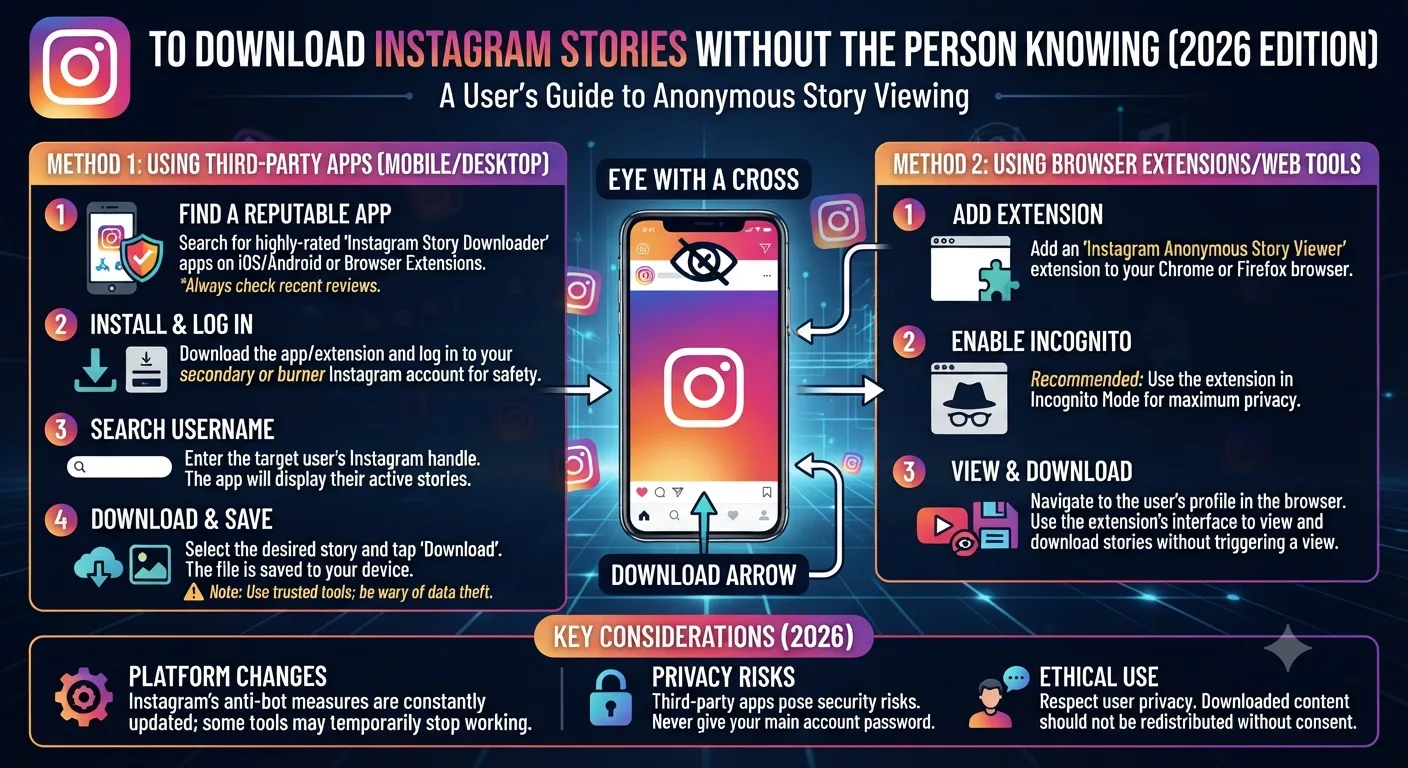
Method 1: Use an Anonymous Instagram Story Viewer and Downloader
An anonymous Instagram story viewer is the cleanest method for downloading stories from public accounts without leaving any trace. These tools fetch the story content through their own servers, so you never appear in the story owner's viewer list and no download notification is sent.
Steps to Download a Story Anonymously
- Open your browser and navigate to an anonymous Instagram story viewer tool.
- Type the username of the account whose story you want to save.
- The tool displays their current active stories and available highlights.
- Click the download button next to the story you want to save.
- The story downloads directly to your device as a video or image file.
This method works for public accounts. The story owner does not receive a notification and does not see your username in their viewer list because the request was made by the tool's server, not your personal account.
Method 2: Screen Record the Story While Watching
Screen recording is a built-in feature on all modern smartphones and works for any story you can see on your screen. On iPhone, you access it through the Control Center. On Android, it is available through the quick settings panel or built-in tools depending on your device.
Instagram does not detect screen recording and sends no notification to the story owner when you use this method. The limitation is that screen recording captures everything on your screen including any notification banners, battery indicators, or other UI elements that might appear during recording. The quality is also dependent on your screen resolution rather than the original file quality.
If you are saving something for professional use like a competitor's campaign or a brand mention, a dedicated download tool gives you a cleaner, higher quality file. For quick personal saves, screen recording works perfectly well.
Method 3: Use Instagram's Built-In Save Feature for Your Own Stories
If the story belongs to your own account, Instagram makes saving simple. When you post a story, Instagram automatically archives it after 24 hours in your Archive section. You can also enable the option to save stories directly to your camera roll as they are posted, which you can configure in Settings under Privacy and then Story Controls.
This method only applies to your own content. It cannot be used to save stories from other accounts.
What to Know About Story Highlights and Expired Stories
Stories expire after 24 hours on the main story feed. Once a story disappears, it is no longer accessible through Instagram's interface or through most third-party viewer tools. If you want to save a story, you need to do it while it is still active.
Story highlights are a different case. Highlights are collections that the account owner has chosen to keep permanently visible on their profile. Anonymous viewer tools can typically access and download highlights from public accounts even after the original 24-hour story window has passed.
Legitimate Reasons People Download Instagram Stories
Competitive monitoring is one of the most common professional use cases. Marketers and agencies save competitor stories to track campaign messaging, creative formats, promotional timing, and brand voice over time. An anonymous viewer tool lets them do this without alerting the competitor that they are being watched.
Brand mentions and user-generated content are another major reason. When a customer or creator posts a story mentioning your brand, saving it quickly is important because it disappears in 24 hours. These saves are valuable for testimonials, social proof, and repurposing with permission.
Journalists and researchers save stories as evidence of public statements, announcements, or events documented on Instagram. Anonymous tools protect their investigative process by keeping their identity out of the viewer data.
Key Takeaways
- Instagram does not notify users when their story is downloaded or screen recorded.
- The only screenshot notification Instagram sends is for disappearing photos sent in DMs, not for profile stories.
- Anonymous story viewer tools download stories without adding you to the viewer list and without any notification to the account owner.
- Screen recording is a reliable backup method that also sends no notification.
- Stories expire after 24 hours so downloading needs to happen while the story is still active.
- Highlights from public accounts remain accessible through viewer tools even after the original story period ends.
Frequently Asked Questions
Does Instagram notify you if someone screenshots your story?
No. Instagram does not send screenshot notifications for stories. The screenshot notification feature only applies to disappearing photos and videos sent through Instagram Direct Messages.
Can I download an Instagram story without the app knowing?
Yes. When you use an anonymous story viewer tool, Instagram sees the tool's server request rather than your account. No notification is sent and your username does not appear in the viewer list.
Can I save a story from a private Instagram account?
Not through a third-party tool. Private account stories are only visible to approved followers. To save a story from a private account, you would need to be a follower and use screen recording.
What is the best quality way to download an Instagram story?
An anonymous story viewer tool downloads the original file at source quality, which is better than screen recording. Screen recording is limited to your screen's resolution and captures additional UI elements.
Can I download an Instagram story after it has expired?
Not typically. Stories expire after 24 hours and are removed from public access. Highlights remain accessible indefinitely. If you want to save a story, download it before the 24-hour window closes.