For years, creators treated Instagram Direct Messages as the intimate layer of their relationship with their audience. Responding to individual DMs, sending exclusive updates to small groups, and building personal connections through private messages was the standard approach. The problem with DMs at scale is obvious: a creator with 100,000 followers cannot maintain meaningful individual message relationships with more than a tiny fraction of their audience.
Instagram Broadcast Channels solve this problem. They allow creators to communicate with their entire interested audience simultaneously, in a format that feels personal and direct rather than like a public post, without the algorithm deciding who sees the message and when. Here is how they work and why creators are moving their most engaged followers into them.
What Is an Instagram Broadcast Channel?
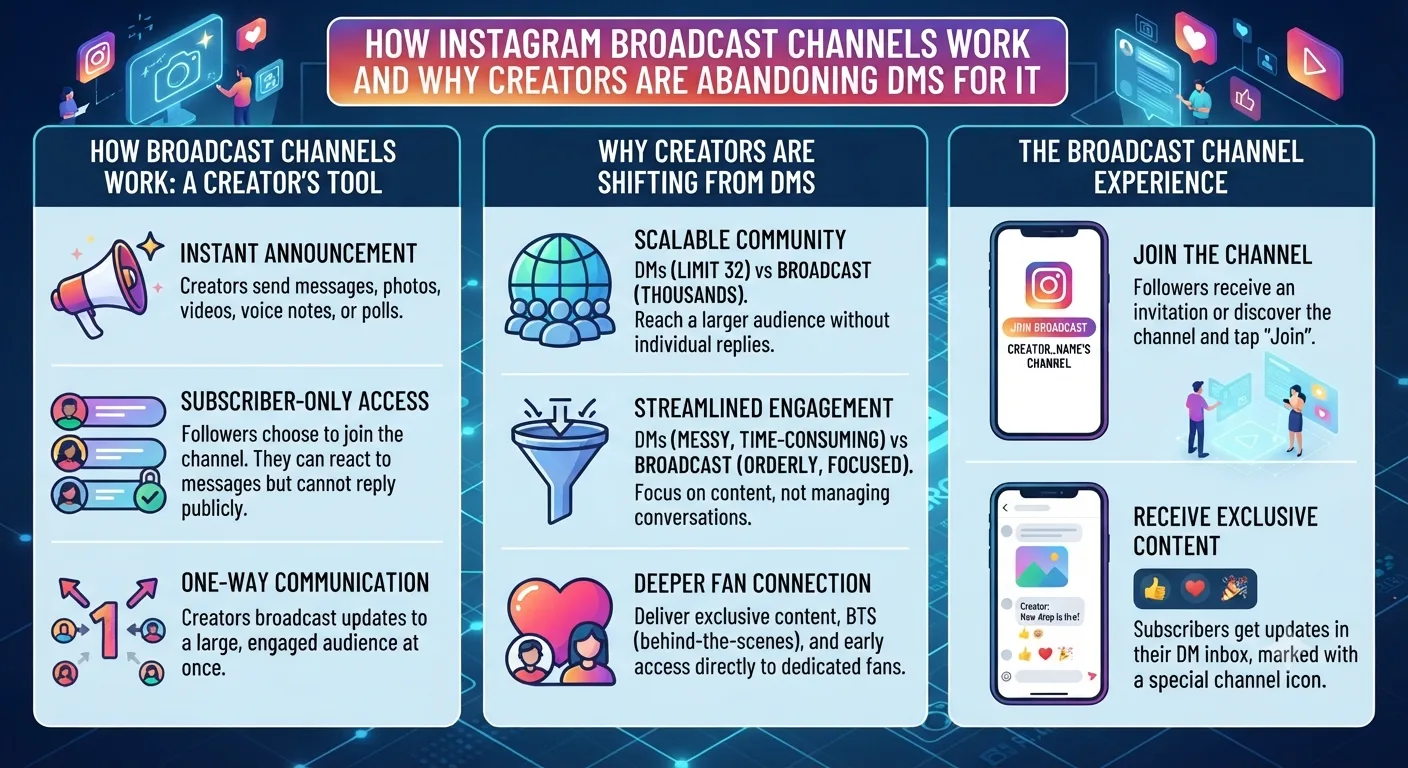
A Broadcast Channel is a one-to-many messaging space that lives inside Instagram Direct. When you create one, followers can choose to join it. Once they join, every message you send in the channel appears in their DMs as a notification. From the member's perspective, it feels like receiving a personal message from you even though the same message went to thousands of people simultaneously.
The creator has full control over the channel. Only the creator can post content. Members can react to messages with emoji responses and can answer polls the creator creates, but they cannot send replies or chat with each other. This keeps the channel clean, on-topic, and manageable at any scale.
What You Can Send in a Broadcast Channel
Broadcast Channels support a richer content format than most people realize when they first encounter the feature.
- Text messages of any length, which appear as standard DM bubbles in members' inboxes.
- Photos and images sent directly in the channel.
- Video clips, which can be up to 60 seconds in length.
- Voice notes, which are one of the most personal and high-engagement formats for creators using the feature.
- Polls where members can vote and see results in real time.
- Links, which are fully tappable and trackable.
- Shared posts from Instagram, including your own Reels and feed posts, which can be shared directly into the channel to drive engagement on that content.
Why Creators Are Moving Away From DMs Toward Broadcast Channels
Scale Without Losing the DM Feel
The core value proposition is scale with intimacy. A creator can now send a personal-feeling update to 50,000 people who have opted into their channel with the same effort as sending one DM. The members receive it as a notification in their DM inbox. The channel name appears alongside friends' messages, which gives it a very different psychological weight than a public post that appears in a feed among hundreds of other pieces of content.
Algorithm-Free Distribution
Posts in a Broadcast Channel are not subject to Instagram's content algorithm. Every member receives every message. There is no feed ranking, no engagement gate, no distribution limit. This is significantly different from feed posts and stories where Instagram decides how prominently to surface content based on engagement history and relationship signals. Broadcast Channels deliver 100 percent message reach to members who have chosen to be there.
Building an Inner Circle Without Cost
Before Broadcast Channels, creating a direct line of communication with your most engaged followers required an external newsletter platform, a Telegram channel, or a Discord server. Each of these requires followers to leave Instagram and join a different platform, which creates significant drop-off. Broadcast Channels keep the experience entirely within Instagram, which dramatically increases the conversion rate from interested follower to active community member.
What Top Creators Are Using Broadcast Channels For
Fitness and wellness creators use Broadcast Channels to send daily workout prompts, motivational notes, and behind-the-scenes content to their most committed followers. The daily message cadence builds a habit of checking the channel and strengthens the creator's relationship with their core community.
Business and finance creators use channels for early access to content, tip sharing, and commentary on current events in their niche before making anything public. This creates a genuine VIP feeling for channel members and drives higher engagement on subsequent public content because members are already primed and excited before the post goes live.
Product-based brands use Broadcast Channels to announce new arrivals, share exclusive discount codes, and run polls asking members what they want to see next. The poll feature gives brands direct audience research capabilities built directly into their community tool.
How to Create a Broadcast Channel
Steps to Launch Your Broadcast Channel
- 1Open Instagram and tap the Direct Message icon in the top right corner of your home screen.
- 2Tap the compose icon to create a new message and select "Create Broadcast Channel" from the options.
- 3Name your channel something specific and value-focused. The name tells potential members what they will get by joining, so make it descriptive and compelling.
- 4Set the channel as visible in your story or profile so followers can discover and join it. You can share the channel invite link in your story to drive initial members.
- 5Send your first message immediately after launching. An empty channel sends the wrong signal. Have two or three messages ready to go at launch so new members arrive to an active, valuable channel.
Key Takeaways
- Instagram Broadcast Channels deliver messages to all opted-in members directly in their DM inbox with no algorithm filtering.
- Only the creator can post in a channel. Members can react and answer polls but cannot chat with each other, keeping the channel clean and manageable at any scale.
- Voice notes are the highest-engagement content format in Broadcast Channels, generating two to three times more reactions than equivalent text messages.
- The key advantage over DMs is scale: creators can communicate with tens of thousands of followers with the same personal feel as a one-to-one message.
- The key advantage over email newsletters and external platforms is that the experience stays entirely within Instagram, dramatically reducing drop-off at the sign-up stage.
- Launching with several messages ready to go is important. An empty channel loses members immediately. Early activity sets the expectation of consistent value delivery.
Frequently Asked Questions
What is Instagram Broadcast Channel?
An Instagram Broadcast Channel is a one-to-many direct messaging space where a creator sends messages to all members at once. Members join voluntarily and receive every message as a DM notification. It is free to create, available to all creator and business accounts, and allows content formats including text, photos, video, voice notes, polls, and shared posts.
Can followers reply to messages in an Instagram Broadcast Channel?
Followers cannot send text replies in a Broadcast Channel. They can react to messages with emoji responses and can answer polls. The one-to-many format means only the creator posts content. This is a feature rather than a limitation because it keeps the channel clean and ensures every member sees every message without a cluttered reply thread.
How do followers join a Broadcast Channel?
Followers join through a shared invite link, which the creator can post in their story, bio, or feed posts. Instagram also surfaces active Broadcast Channels as a join suggestion in followers' DMs. Members can leave a channel at any time by opening it and selecting Leave Channel.
Is there a limit to how many members a Broadcast Channel can have?
Instagram has not published an official member limit for Broadcast Channels. In practice, large creator accounts have built channels with hundreds of thousands of members without hitting a technical restriction. The channel functions the same regardless of size because content goes from the creator to all members simultaneously without any group chat infrastructure.
Can you monetize an Instagram Broadcast Channel?
Not directly through Instagram's payment infrastructure as of 2026. Creators monetize their channels indirectly by using them to promote products, drive traffic to paid communities outside Instagram, share affiliate links, and announce launches to an engaged audience. The channel itself is a free tool. Monetization happens through what creators promote within it.