Every creator and brand on Instagram has had the experience: your follower count drops by one, five, or fifty and you have no idea who left or when. Instagram removed the ability to see who unfollowed you years ago and has never brought it back. The platform notifies you about likes, comments, and new follows but stays completely silent on unfollows.
This guide covers every working method to track unfollows in 2026, what to look for in a tracking tool, and how to use unfollow data strategically rather than just emotionally.
Why Instagram Does Not Tell You Who Unfollowed You
Instagram's decision to hide unfollow notifications is deliberate and tied to platform health. If every unfollow generated a notification, users would feel surveilled when choosing to leave an account, which would discourage the natural pruning of feeds that keeps the platform usable. It would also create an environment where creators feel compelled to respond to or chase every person who leaves.
From a business standpoint, Instagram also benefits from creators not having easy access to precise unfollow data, since it keeps creators focused on the platform's own analytics tools rather than third-party applications.
The result is that anyone who wants unfollow visibility has to use an external tool, and that market has grown significantly over the past several years.
The Best Instagram Unfollow Tracker Apps in 2026
Snoopreport
Snoopreport is one of the most purpose-built tools for tracking Instagram account activity including unfollows, new follows, likes, and general engagement patterns. You enter the username of any public account, and Snoopreport generates weekly activity reports showing changes in their follower and following lists.
The key advantage of Snoopreport is that it tracks other accounts, not just your own. If you want to monitor a competitor's following growth or track whether a specific account unfollowed you, Snoopreport handles both cases. Reports arrive by email weekly and can be accessed through a dashboard.
FollowMeter
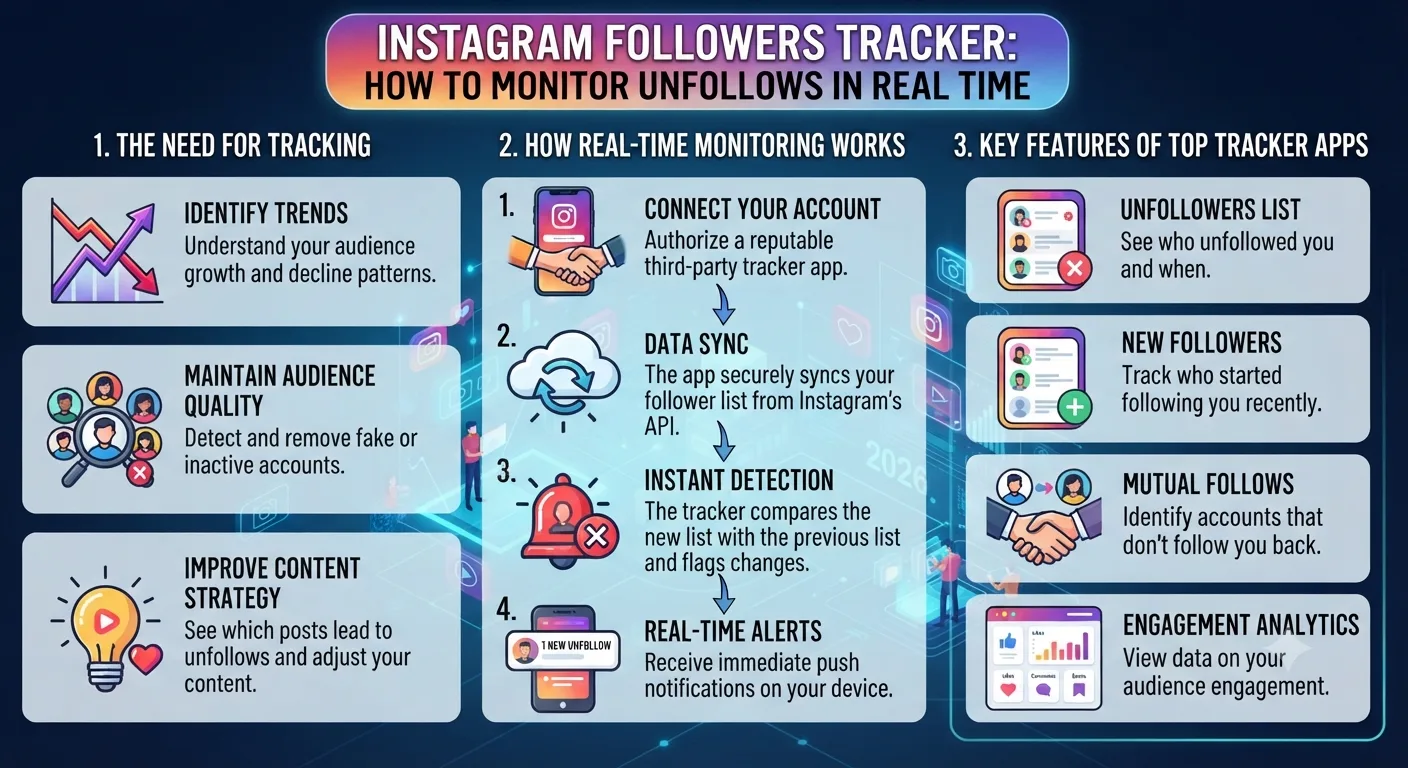
FollowMeter is designed for monitoring your own Instagram account's follower dynamics. After connecting your account, it tracks who followed you, who unfollowed you, who you follow that does not follow you back, and who follows you that you have not followed back. The interface is clean and the data updates regularly throughout the day.
FollowMeter does not require your Instagram password to function, which is an important security consideration. It works through Instagram's authorized API where possible and shows data for your own account rather than external accounts.
Followers Track for Instagram
This app is one of the most downloaded follower tracking tools across iOS and Android and has maintained strong accuracy scores in user reviews through 2026. It provides a dedicated unfollowers list, a ghost followers section for accounts that never engage with your content, and a mutual followers view. The free tier covers basic unfollow tracking and the paid tier adds historical data and more frequent refresh rates.
How to Track Unfollows Manually Without an App
If you prefer not to use a third-party app, manual tracking is possible but requires consistent effort. The core method is taking a screenshot or spreadsheet record of your followers list at regular intervals and comparing them over time.
Manual Unfollow Tracking Method
- Go to your Instagram profile and note your exact follower count. Record it with the date in a spreadsheet or notes app.
- Use Instagram's followers list to export or manually record the usernames of your followers. This is practical for accounts with under 500 followers. For larger accounts it becomes unmanageable.
- Repeat this process weekly. When the count drops, compare your current list against the previous record to identify who is missing.
- Search the missing username on Instagram to confirm whether they deleted their account, deactivated, or simply unfollowed.
This approach works reasonably well for small accounts. For accounts with thousands of followers, the comparison process becomes too time-consuming to be practical and a dedicated app is the more sensible investment.
What Unfollow Data Actually Tells You
Tracking unfollows is useful beyond satisfying curiosity. Patterns in unfollow behavior contain real strategic information about your content and audience.
If you notice a spike in unfollows following a specific type of post, that is a signal your audience did not respond well to that content direction. If unfollows consistently happen in the days after you run a giveaway or follow-to-win campaign, it tells you those tactics are attracting followers who were never genuinely interested in your content and leave once the incentive is gone.
A steady, slow trickle of unfollows is normal on any account and is not a cause for concern. A sudden sharp drop, particularly one that corresponds with a specific post, content pivot, or posting frequency change, is worth investigating.
How to Reduce Unfollows Over Time
The most effective way to reduce unfollows is to attract the right followers in the first place. Followers gained through giveaways, follow-for-follow exchanges, and broad hashtag reach have significantly higher unfollow rates than followers who found your account because of a specific piece of content that resonated with them.
Consistent posting keeps followers engaged and reduces the passive unfollow that happens when someone simply forgets an account exists. Accounts that post regularly stay visible in followers' feeds and stories trays, which reduces the chance of being forgotten and eventually unfollowed during a feed clean-up.
When you change your content direction significantly, expect a short-term unfollow spike. Followers who came for a previous content style will leave when that content stops. This is a normal and healthy part of refining your niche rather than a crisis.
Key Takeaways
- Instagram does not notify you when someone unfollows you and has no built-in feature for tracking unfollows.
- Snoopreport is the strongest tool for tracking unfollow activity on external accounts including competitors.
- FollowMeter and Followers Track are strong options for monitoring your own account's follower dynamics.
- Manual tracking through spreadsheet comparison works for small accounts but becomes impractical above a few hundred followers.
- A natural unfollow rate of 1 to 3 percent per month is normal. Spikes tied to specific content or campaigns are worth investigating.
- Attracting followers through relevant content rather than incentive campaigns produces significantly lower long-term unfollow rates.
Frequently Asked Questions
Is there an app to see who unfollowed you on Instagram?
Yes. FollowMeter, Followers Track for Instagram, and Snoopreport are among the most reliable options in 2026. They work by comparing snapshots of your follower list over time and flagging accounts that have dropped off.
Does Instagram notify you when someone unfollows you?
No. Instagram sends no notification of any kind when someone unfollows your account. The only way to know is to compare your current follower list against a previous record or use a third-party tracking tool.
Can you see who unfollowed you on Instagram for free?
Most follower tracker apps offer a free tier that covers basic unfollow detection. Manual tracking using Instagram's follower list and a spreadsheet is completely free but time-consuming. The paid tiers of tracking apps typically add historical data, more frequent updates, and competitor monitoring.
Why did I lose followers on Instagram without posting anything?
Instagram periodically purges inactive accounts, bot accounts, and accounts that violate its terms of service. Follower count drops without any change in your posting activity are often the result of these cleanups rather than real people choosing to unfollow. A small drop of a few percent during these purges is common and expected.
Is it safe to give a follower tracker app my Instagram login?
You should never enter your Instagram username and password into a third-party app that is not officially authorized by Meta. Reputable tracking tools like FollowMeter work through authorized API access and do not require your password. Always check what permissions an app requests before connecting it to your account.