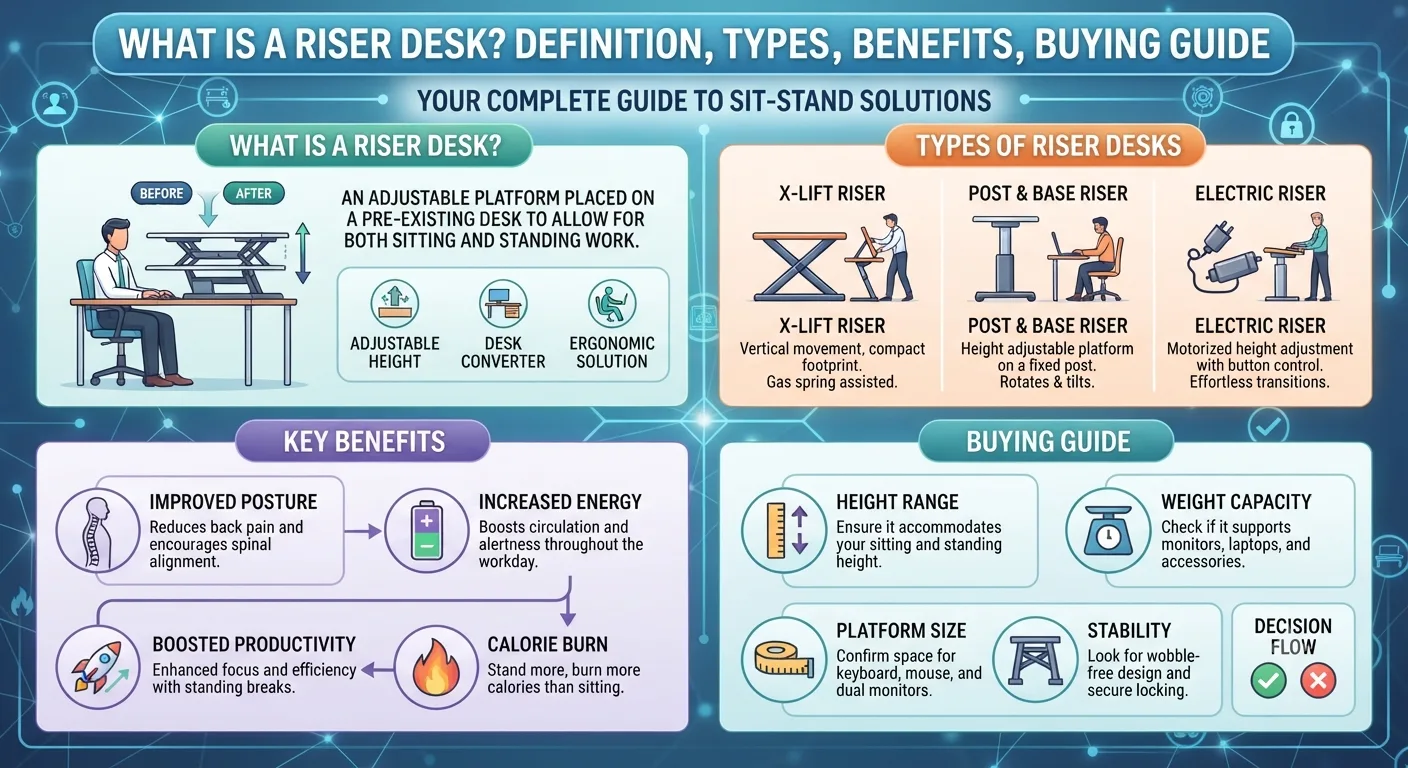
What Is a Riser Desk? Definition, Types, Benefits, Buying, Guide
Have you ever spent eight or more hours a day typing on a keyboard and found your neck stiff, your lower back sore, or yourself suffering from a midday energy crash? Then you've encountered the problem that a riser desk is designed to solve.
Staying seated for this long is unhealthy, as is sitting in the same position for hours on end - and the modern workplace has spent decades ignoring the health implications.
The riser desk is one of the most practical and inexpensive ways to address this problem and is seeing increased adoption as a piece of office furniture in home offices, corporate workstations, and study rooms.
But what is a riser desk, and what is the difference between a riser desk and a standing desk?
What types of riser desks are there?
Is one such type suited to your needs?
This guide explains all of this and much more.
What is a Riser Desk?
A riser desk (also called a desk riser, standing desk converter, or sit-stand converter) is a height-adjustable
platform that is placed on top of an existing desk to allow the user to raise their monitor, keyboard, and mouse to standing height, enabling them to effortlessly change between sitting and standing throughout their workday without the need to purchase a new desk.
They are also an excellent option for those that do not wish to purchase a brand new desk but still want the health benefits that a standing desk brings.
A riser desk is essentially a "desk on top of a desk".
You can simply place the platform on top of the desk when you want to stand and move it aside or put it down when you want to sit.
The mechanism usually only takes a few seconds to operate, allowing you to swiftly transition between sitting and standing positions while leaving the original desk undisturbed (with all of its drawers and storage space intact).
A riser desk therefore enables the user to simply place the platform on top of their existing desk when they want to stand and put it down when they want to sit again.
Riser Desk vs. Standing Desk
What is the difference between a standing desk and a riser desk?
Many confuse the two terms, but they are actually fundamentally different pieces of equipment.
The following table details the differences:
Feature
Riser Desk
Standing Desk
What it is
A platform added on top of an existing desk
A desk with an adjustable height
Replaces your desk? No - sits on top Yes - full replacement
Cost
$50-$300 typically $300-$2,000+
Setup time
Minutes Assembly required
Workspace surface
Limited to platform area Full desk surface moves
Stability
Good but limited by base desk Generally more stable
Best for
Budget-conscious, renters, light use Long-term, heavy use, multi-monitor setups
The main difference between a riser desk and a standing desk is that a riser desk is used to convert an existing desk into an adjustable-height desk, while a standing desk requires the purchase of an entirely new desk with an adjustable height.
The difference in price of $450-$2,600+ is the reason why some users think it is more cost-effective to buy a standing desk converter (a riser desk) instead of a new standing desk.
If you already have a solid desk, you may want to consider investing in a standing desk converter (riser desk) instead of a new standing desk.
There is also a third category of standing desks, namely the fixed desk.
A fixed desk has a set height and cannot be adjusted, which means it is permanently in the standing position and does not allow sitting at all.
This is different from both a riser desk and a height-adjustable sit-stand desk.
How Does a Riser Desk Work?
A riser desk works by allowing the monitor, keyboard, and mouse to be raised vertically.
Depending on the type of desk, this can be done using levers, springs, or electric motors to adjust the height.
Most riser desks are designed with two tiers:
A higher tier that holds your monitor or laptop at eye level
A lower tier that holds your keyboard and mouse at elbow height
Using these two tiers ensures that when the platform is raised, both your screen, keyboard, and mouse remain in their correct ergonomic positions, whether you are sitting or standing.
Types of Riser Desks
There are several types of riser desks.
They each serve different purposes and have their own advantages and disadvantages.
The following sections provide an overview of each type.
1. Single-Tier Risers
Single-tier risers are the most basic type of riser desk.
They are only one tier, and they are used to raise the monitor or laptop to a higher position (eye level).
The limitation of single-tier risers is that there is no keyboard tray, as such; if you want to use a keyboard, you must use a traditional keyboard at desk level (which will put it at an unhealthy angle) or you can place it on the same tier as the monitor (which is rarely comfortable for the wrists).
Single-tier risers are most useful for laptop users that only want to raise their screen (and not have to worry about adjusting keyboard height) and for users that only want to adjust the monitor or laptop.
2. Dual-Tier Risers
Dual-tier risers are the most popular type of riser desk.
They are made up of two tiers: the upper tier holds the monitor(s) and the lower tier holds the keyboard and mouse.
Dual-tier risers are the most recommended by ergonomists and provide the best possible setup for sitting and standing.
The upper and lower tiers allow the monitor(s) to be at eye level while the keyboard and mouse are at elbow height, which is ideal for ergonomics.
3. Full-Width Risers
Full-width risers span the full width of the desk and provide the most working space of any riser type.
They are ideal for dual monitor setups, full-sized desktop workstations, or anyone that wants the most working surface area possible.
However, they also take up the most space on the desk and are not ideal for users with limited desk space.
If you need more space, a full-width riser is the best option.
4. Compact Risers
Compact risers have a small footprint and are most useful in shared workspaces, such as a cubicle, or for people that use a small home office desk.
They are ideal if you need to save desk space, or if you are working in a shared space.
5. Manual Gas Spring Risers
Manual gas spring risers are the most common type of riser desk.
They use a lever-operated piston to assist with the lifting of the desk.
They are also silent, fast, and do not require a power source, making them ideal for flexible office setups.
Gas spring mechanisms are much easier to operate than newer screw or pin-style risers that require the user to manually tighten the riser at each height. Most gas spring risers can be operated with one hand and are only raised/lowered in under three seconds by most users.
6. Electric Desk Converters
Electric risers are ideal for those with heavy setups or physical limitations.
Moving the platform only takes the touch of a button, and many electric risers allow you to pre-set your preferred height.
This allows you to effortlessly return to the standing height that is most comfortable for you throughout your workday.
Electric risers are the most convenient, as they allow the user to easily change their height, and they can be programmed to your preference. Electric risers are the most expensive type of riser desk and require access to an electrical outlet.
7. Z-Frame vs. X-Frame
There are two mechanical lift designs that are commonly used in the riser desk market: Z-frames and X-frames.
Z-frames tend to move out towards the user as they are raised, providing more legroom, while X-frames tend to move straight up and down, which is better for compact spaces or narrow desks.
The following image shows the difference between the two designs:
If your desk is deep enough to accommodate the forward movement of a Z-frame, you may want to consider a Z-frame desk for the extra legroom it provides. While, for users with narrow desks, an X-frame desk would be a better option.
The Health Benefits of Using a Riser Desk
There is overwhelming scientific backing for the idea that breaking up prolonged sittings is healthy and that a riser desk is one of the easiest ways to accomplish this.
Reduced Back and Neck Pain
Sitting puts up 90% more pressure on the discs of the spine than standing and several participants have demonstrated up 32% improvement in lower back pain after switching to standing desks after a few weeks. Sitting for long periods of time puts increased pressure on the discs in the spine, while standing, the intervertebral discs experience about the same pressure as when you are lying down. Alternating between sitting and standing even for short periods of time will significantly reduce this accumulated pressure on the discs of the spine.
Less Time Sitting
A 2018 systematic review of 34 studies found that sit-stand interventions reduced sitting time by approximately 84-116 minutes per day.
Reducing sitting time by almost 2 hours per day is significant for most office workers that spend the majority of their day at a desk. Additionally, the study found that taking turns between sitting and standing for these short durations helped to offset some of the detrimental physiological effects of sitting for prolonged periods of time.
Improved Posture
A subtle benefit of having a sit-stand desk is the encouragement it provides to improve a person's posture.
If you are working at a standing desk, slouching causes immediate discomfort which promotes good posture. Good posture when standing also promotes good posture when sitting. Experts recommend the 20:8:2 rule, meaning 20 minutes of sitting, 8 minutes of standing, and 2 minutes of movement. A riser desk makes sitting and standing easy to incorporate into the workday.
Decreased Risk of Chronic Diseases
A review of 18 studies found that people who sit the most are at a 49% greater risk of dying earlier than those who sit the least. While not a cure-all for a sedentary lifestyle, a riser desk serves as a necessary step in reducing the risks of a number of chronic diseases associated with sitting for prolonged periods of time.
Increased Energy and Focus
Many individuals who use sitting desks report feeling more energetic throughout the afternoon, and research bears this out, finding that there was a net decrease in pain symptoms and a small increase in self-reported measures of stress, wellbeing, vigour, and pain for those who used a sit-stand desk. The reason for this boost may be twofold: increased blood flow due to standing and a psychological benefit due to interrupting prolonged sitting.
Calorie Burn
Standing burns 20% more calories than sitting. Over the course of an entire week this accumulates to a significant amount of extra calories burned.
How to Set Up a Riser Desk Correctly
Having a riser desk is one thing, but knowing how to use it properly is another matter entirely. The health benefits of a riser desk will largely be reaped by users if they set it up correctly.
Monitor height
The top of your computer monitor should be at or just below eye level. If it is too low you will constantly have to look down and if it is too high you will have to continually look up. This encourages bad posture and is the opposite of what a riser desk is meant to promote.
Keyboard position
Your elbows should be at roughly 90 degrees with your forearms parallel with the ground or slightly hanging down. Your wrists should also be in a neutral position, meaning not bent up or down. Traditional office desks are 28-30 inches tall and this height is only suitable for individuals 5'10" or taller. A properly set up riser desk eliminates this problem for everyone else.
Distance to monitor
Your monitor should be about an arm's length away from you or 20-28 inches from your eyes. Anything closer causes eye strain and anything further away forces you to adopt a hunched posture.
Anti-Fatigue Mat
If you are going to be standing for long stretches of time, an anti-fatigue mat is money well spent. Standing for 30+ minutes at a time on a hard surface will quickly fatigue your legs and discourage you from using the standing surface all together. An anti-fatigue mat eliminates most of this discomfort.
Build up your time standing slowly
If you are just getting accustomed to sit-stand desks, do not try to stand for half your work day. Begin with 15-20 minute increments of standing followed by sitting and gradually increase the amount of time spent standing. Movement is the key word here. Small regular changes in posture and the occasional break are better than standing the whole time. Studies have shown that the main benefit of standing desks is found in the variations in posture.
Pros and Cons of a Riser Desk
The Pros
Cost effective
Riser desks are significantly cheaper than a full standing desk. For a mere $130-$250 you can permanently attach a desk extender to your current desk and reap most of the health benefits associated with a standing desk.
No need to replace your desk
Unless you have a desk you absolutely despise, you can save the money you would have spent on a new desk and keep the one you like.
Quick and easy setup
Most riser desks require no tools to install. Simply unpack the riser desk and you are ready to begin alternating between sitting and standing.
Portable
Unlike a full standing desk, a riser desk can be easily moved. This is useful if you work in more than one location.
Reversible
If you do not like your riser desk, you do not have to use it. Unlike a full standing desk, a riser desk can be removed at any time. If you find that you really do not like it, you can remove it and no longer have to deal with it.
The Cons
Limited desk space
Once a riser desk is permanently attached to a desk, the amount of desk space is reduced. While a riser desk makes your desk height adjustable, it does not magically increase your desk surface area. On the contrary, adding the riser desk reduces it. This change in desktop space can feel cramped and busy once the riser desk is permanently attached.
Limited to the riser
In a riser desk, only the components on the riser move up and down. Everything else on the base desk stays at the height of the base desk. This is a disadvantage if you want to move multiple items around at once. On a full standing desk, everything moves, so your phone, notes, and other items you may want to use while standing will all be at the proper height.
Wobble at max height
At maximum height, some riser desks wobble, especially if you have heavy computer monitors on the desk. Full height standing desks are more stable at maximum height due to the mechanical advantage from the base.
Limited height range
The maximum height of the riser desk is limited by how much the desk can extend plus the height of your desk. For very tall individuals, this can still be an issue as the combined height of the riser desk and the base desk still may not be sufficient for a comfortable standing position.
Does not fix your base desk
If you have a bad base desk, a riser desk will not fix it. In this situation, it may be best to get a full standing desk instead.
Who should get a riser desk?
A riser desk may be for you if:
✅ You have a desk you like and don't want to replace it with a standing desk
✅ You want the convenience of a stand desk with minimal investment
✅ You can't make permanent modifications to your desk due to rental agreements
✅ You want to test out the concept of a standing desk
✅ You have limited space and the riser desk is a more compact and space efficient converter
✅ You need the portability and flexibility a full standing desk cannot provide
A full standing desk is for you if:
🔲 You spend 6+ hours a day at your desk
🔲 You need a dual monitor setup with ancillary equipment
🔲 You want the ability to raise and lower your entire desk
🔲 You need stability with heavy monitors
🔲 You have a base desk that is old, wobbly, or cheap. You are willing to invest in a quality desk that can last a lifetime.
What to Look for When Buying a Riser Desk
Assuming you have decided to purchase a riser desk, here are a few of the most important aspects to consider before you buy.
Height Range
Make sure the combined height of the riser desk plus your desk reaches a comfortable standing height. For most people, this means the keyboard tray ends up being at elbow height with your arms at roughly 90 degrees when standing. This should be a total height of 40-46 inches from the floor.
Weight Capacity
Make sure the riser desk is rated to support your equipment. A dual monitor setup with a large monitor can weigh up to 25-35 lbs.
Lift Mechanism
Gas spring mechanisms are smooth and light, whereas lever or pin mechanisms can be stiff. Electric mechanisms require power, but are the easiest to use. Make sure you pick a lift mechanism appropriate for how often you plan on using the riser desk. Mechanisms with less resistance are best for people who plan on frequently changing the height of their desk.
Platform Size
Make sure the platform is large enough for your items. Measure your monitors and keyboard before you buy to ensure a proper fit.
Build Quality and Stability
At maximum height, most riser desks do have some give. Read reviews that discuss the stability of the desk at maximum height before purchasing. If you have large, heavy monitors and tend to type with both hands on the keyboard, this will greatly impact the stability of the desk when standing.
Frame Design
As discussed earlier, Z-frames extend outward as they rise, while X-frames rise straight up. Z-frames provide more legroom, but require deeper desk space, while X-frames are more compact.
Riser Desk vs. Height-Adjustable Desk: Which Is Right for You?
The truth is that it really depends on where you are at with regard to sitting and standing desks.
If you have never worked at a standing desk and don't know if you will like it, a riser desk provides an easy inexpensive way to try it out. Once you have used a riser desk for a few months and are confident that you want to continue using a standing desk, then it is time to invest in a full standing desk. Riser desks are less expensive and can be a good way to test if you will enjoy a standing desk. A riser desk will save you a significant amount of money if you decide you do not like standing desks.
On the other hand, if you spend a lot of time at your desk and want the flexibility of a standing desk, but do not want to throw away your old desk, a riser desk is a perfect solution. If your base desk is old or wobbly, a full standing desk may be the right choice. There is no right or wrong choice when it comes to standing desks. It is all about what works best for you.
Frequently Asked Questions
What is the difference between a riser desk and a standing desk?
A riser desk is basically a platform that is permanently attached to your desk allowing you to raise only part of your desk (usually the part where your computer and keyboard are). A standing desk is a new desk that allows you to raise and lower your entire desk. A riser desk is less expensive and quicker to set up, but a standing desk will provide more stability and flexibility.
Is a riser desk worth it?
For most people who spend a lot of time at their desks, yes. A riser desk reduces the amount of time spent sitting, can help reduce back and neck pain, and provides a much-needed break from sitting all day, all for a small fraction of the cost of a standing desk. If you have a desk you like, a riser desk is a great option to consider.
How high should a riser desk be set?
When standing, your keyboard tray should be at elbow height with your arms at roughly 90 degrees and the top of your monitor should be at or just below eye level. This means the keyboard surface should be around 40-44 inches from the floor (total height of base desk plus riser desk).
Can any desk support a riser desk?
Most desks can support a riser desk, but there are a few factors to take into consideration when choosing a desk to pair with a riser desk. A wobbly desk will result in a wobbly riser desk as well, so it is important to pick a desk that is sturdy and strong enough to support your workstation. A desk that is at least 24 inches deep and free of any structural weaknesses can support a riser desk.
How long should I stand while using a riser desk?
The 20:8:2 rule is a good guideline. This means 20 minutes of sitting, 8 minutes of standing, and 2 minutes of movement. New users should start with shorter intervals of standing and gradually work their way up to the 8-minute mark. Standing for long stretches of time should be avoided. Alternating between sitting, standing, and moving should be enough to provide the necessary benefits of a standing desk.
Do I need an anti-fatigue mat with a riser desk?
An anti-fatigue mat is not strictly necessary, but it can significantly improve your comfort if you plan on spending a lot of time on the standing surface. Standing for long stretches of time on a hard surface can quickly tire your legs and discourage you from using the standing surface. An anti-fatigue mat will eliminate most of this discomfort.
Are electric riser desks better than manual ones?
Electric riser desks allow you to easily set your desired height and automatically return to that height anytime you sit and stand. Gas spring riser desks are much less expensive, do not require a power source to operate, and require minimal effort to adjust. Electric riser desks make the most amount of sense if you plan on regularly switching between sitting and standing.
Read More :